You’ve probably heard that WordPress powers a huge part of the internet. But what most people don’t understand is how powerful it actually is—and where it completely breaks down. In this guide, you’ll get a clear, no-BS breakdown of what WordPress can do, where it wins, and when you should avoid it.
Key Takeaways
- WordPress dominance: WordPress powers over 43% of all websites globally, making it the most widely used CMS.
- Flexibility engine: WordPress flexibility comes from its ecosystem of themes and plugins, enabling everything from blogs to full platforms.
- Scalability truth: WordPress scalability depends heavily on hosting, optimization, and development practices—not the platform alone.
- SEO strength: WordPress is highly effective for SEO due to its structure, plugins, and content-first design.
- Best use cases: WordPress works best for content-driven websites, business platforms, and MVPs.
- Real limitation: Plugin dependency and poor optimization—not WordPress itself—are the main reasons sites fail.
- Strategic choice: Choosing WordPress should be based on project requirements, not hype or trends.
What Is WordPress?
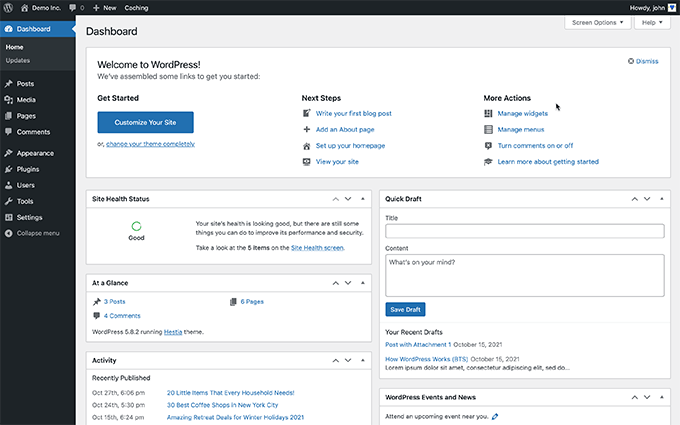
WordPress is an open-source content management system (CMS) that allows users to build and manage websites without coding from scratch.
First, WordPress started as a blogging platform but evolved into a full website-building system. Today, it powers everything from personal blogs to enterprise-level websites.
For example, major brands like TechCrunch and CNN use WordPress to manage high-traffic content platforms.
Second, there are two versions you need to understand:
- WordPress.org (Self-hosted): Full control, unlimited customization
- WordPress.com: Hosted solution with limitations
👉 If you’re serious, always go with WordPress.org.
WordPress is not just a blogging tool—it is a full-scale website operating system.
Why WordPress Matters Today
WordPress matters because it powers a massive portion of the internet and offers unmatched flexibility for building websites.
First, the numbers don’t lie:
- WordPress powers 43%+ of all websites — Source: W3Techs, 2025
- It holds 60%+ CMS market share — Source: W3Techs, 2025
- Over 590 million websites use WordPress — Source: DemandSage, 2026
Second, this dominance exists for one reason: flexibility at scale.
For example, a beginner can launch a blog in 1 hour, while a developer can build a SaaS-like platform using APIs and custom plugins.
WordPress wins because it adapts to both beginners and professionals.
How Powerful Is WordPress Compared to Other Platforms?
WordPress is powerful because it combines customization, scalability, and control in a way most platforms cannot match.
Let’s break it down.
Customization Power
WordPress customization comes from themes, plugins, and custom code.
First, there are 60,000+ plugins available — Source: WordPress Directory, 2025
For example, you can add:
- SEO tools (Yoast, RankMath)
- E-commerce (WooCommerce)
- Membership systems
- Custom dashboards
Second, developers can modify everything using PHP, APIs, and hooks.
This means WordPress is only limited by your skill—not the platform.
Scalability Reality
WordPress scalability depends on infrastructure, not just software.
First, WordPress can handle massive traffic when optimized properly.
For example, high-traffic sites like news platforms use advanced hosting, caching, and CDN layers to scale.
Second, poor setup leads to failure.
- Cheap hosting → slow site
- Too many plugins → crashes
WordPress can scale—but only if you build it correctly.
Flexibility Across Use Cases
WordPress flexibility allows it to support multiple business models.
For example, you can build:
- Blogs
- Business websites
- E-commerce stores
- Learning platforms
- Marketplaces
WooCommerce alone powers 33%+ of eCommerce sites globally — Source: StoreLeads, 2025
WordPress is not a niche tool—it is a multi-purpose platform.
WordPress is powerful for SEO because it is built for content-first architecture.
First, it supports:
- Clean URLs
- Meta control
- Schema integration
Second, plugins like Yoast SEO simplify optimization.
For example, you can optimize titles, meta descriptions, and internal links without coding.
WordPress doesn’t just support SEO—it’s built around it.
What Can You Actually Build Using WordPress?
WordPress can be used to build almost any type of website except highly complex real-time systems.
Let’s break it down.
Blogs and Content Platforms
WordPress is the best platform for content-driven websites.
For example, bloggers publish millions of posts monthly using WordPress.
If your business depends on content, WordPress dominates.
Business Websites
WordPress is ideal for company websites and service businesses.
For example:
- Agency websites
- Portfolio sites
- Startup landing pages
You can build a full business presence without heavy coding.
eCommerce Stores
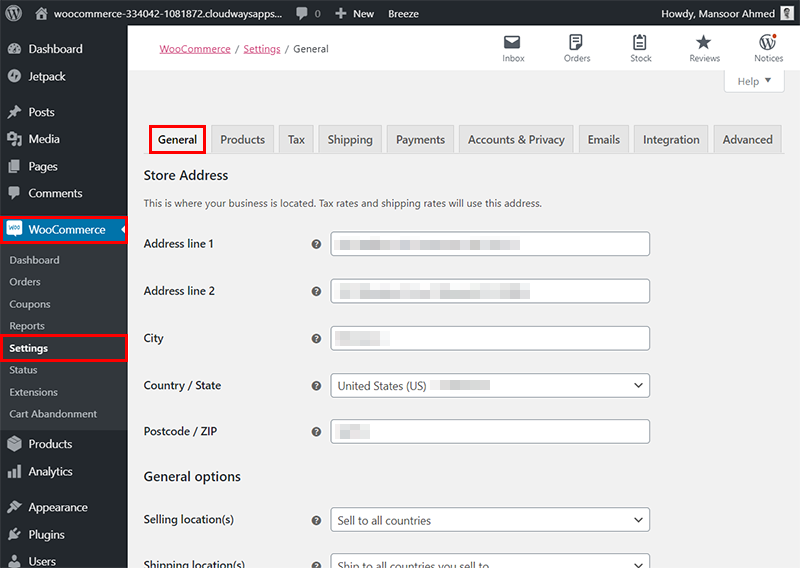
WordPress powers eCommerce through WooCommerce.
For example:
- Digital product stores
- Physical product shops
- Subscription businesses
WooCommerce gives Shopify-level functionality with more control.
Membership & Community Platforms
WordPress supports membership systems using plugins.
For example:
- Paid communities
- Online courses
- Subscription platforms
You can build a SaaS-like system without building SaaS from scratch.
Custom Web Applications
WordPress can act as a backend for custom applications.
For example:
- Headless WordPress + React frontend
- API-based apps
This is where advanced developers unlock real power.
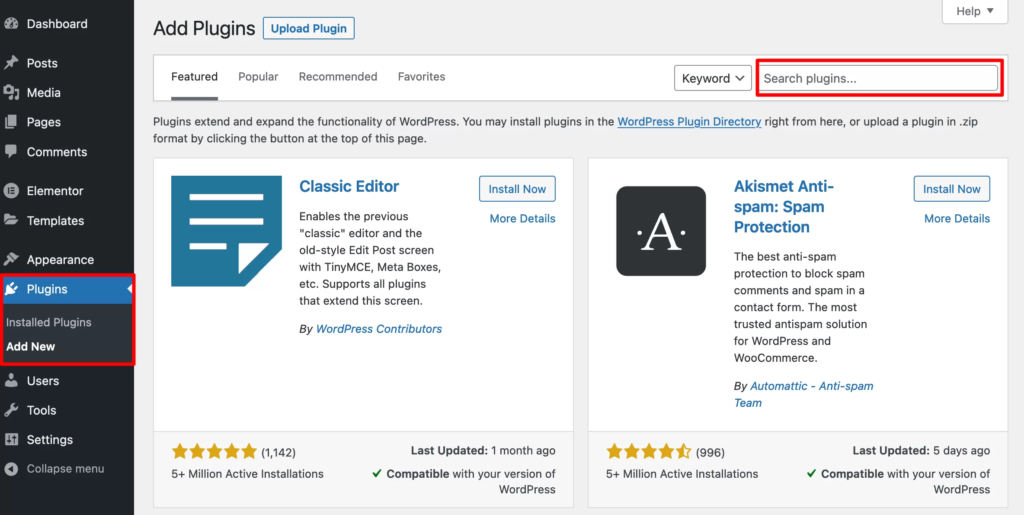
What Are the Biggest Advantages of WordPress?
WordPress advantages come from control, cost efficiency, and ecosystem strength.
First, it is open-source, meaning no platform lock-in.
Second, it has a massive ecosystem:
- 60,000+ plugins
- 30,000+ themes
Third, it is cost-effective.
For example, you can launch a website for under ₹5,000–₹10,000.
WordPress gives you enterprise-level capability at startup-level cost.
What Are the Limitations of WordPress You Should Know?
WordPress limitations come from mismanagement, not inherent weakness—but they are real.
Performance Issues
WordPress becomes slow if not optimized properly.
For example:
- Heavy themes
- Too many plugins
- Poor hosting
Plugin Dependency Risk
WordPress heavily depends on plugins for functionality.
For example, if a plugin breaks, your site can break.
More plugins = more risk.
Security Concerns
WordPress is a common target for attacks due to its popularity.
For example:
- Outdated plugins → vulnerabilities
- Weak passwords → hacking
Not Ideal for Real-Time Apps
WordPress is not suitable for complex real-time systems.
For example:
- Chat applications
- Trading platforms
- High-frequency data systems
These require custom backend development.
Is WordPress Good for Startups and MVPs?
WordPress is one of the best platforms for startups and MVPs because it reduces cost and development time.
First, you can launch quickly.
For example, an MVP can be built in 1–2 weeks instead of months.
Second, you can validate ideas before scaling.
WordPress is perfect for testing ideas—not scaling everything from day one.
When Should You Avoid Using WordPress?
You should avoid WordPress when your project requires heavy backend logic or real-time processing.
Avoid it for:
- SaaS with complex logic
- Real-time systems
- AI-heavy platforms
In these cases, go for custom development.
Tools & Ecosystem That Make WordPress Powerful
WordPress becomes powerful because of its ecosystem of tools and extensions.
Page Builders
- Elementor
- Gutenberg
Essential Plugins
- SEO → Yoast, RankMath
- Security → Wordfence
- Performance → LiteSpeed Cache
Hosting & Optimization
Hosting plays a critical role in WordPress performance.
For example:
- Shared hosting → slow
- Managed hosting → fast
| Component | Recommended Option |
|---|---|
| Hosting | Cloud / Managed WP |
| Theme | Lightweight (Astra) |
| Builder | Elementor / Gutenberg |
| SEO | RankMath / Yoast |
| Cache | LiteSpeed / WP Rocket |
What Should You Do Next?
Choosing WordPress depends on your specific goal, not general advice.
Here’s what you should do:
- Define your goal (blog, business, SaaS, etc.)
- Start with WordPress if:
- You need speed
- You need SEO
- You need flexibility
- Avoid overcomplicating early
Start simple. Optimize later. Scale when needed.
Conclusion
WordPress is powerful—but only if you use it correctly.
First, it dominates the internet for a reason: flexibility, scalability, and cost efficiency.
Second, most failures come from poor execution, not platform limitations.
WordPress is not magic—it’s a tool. The power depends on how you use it.
Author
Written by Ravula Charan — Founder of Nothing Down Agency, full-stack WordPress developer and product builder specializing in scalable web solutions and digital ecosystems.
Reviewed by RC Editorial Team — Experts in web development, SEO, and digital product strategy.
Disclaimer: This article was initially drafted using AI assistance. However, the content has undergone thorough revisions, editing, and fact-checking by human editors and subject matter experts to ensure accuracy.