
LinkedIn reported a 35% increase in full-stack developer job postings over the last year, making it one of the most actively recruited roles in the entire technology sector. The U.S. Bureau of Labor Statistics projects 13% growth in web developer employment through 2030 — significantly faster than the average for all occupations. Meanwhile, the 2025 Stack Overflow Developer Survey, drawing responses from over 49,000 developers across 177 countries, confirmed that JavaScript has held the top spot as the most widely used programming language for the 13th consecutive year.
All of this points to one clear conclusion: full-stack web development is not a trend — it is a durable, high-demand skill set that companies across every industry are actively paying for. The question is not whether to learn it. The question is how to learn it in the right order, without wasting months going in the wrong direction.
This guide gives you exactly that. A structured, advanced roadmap — 15 modules, organized in the sequence that professional developers actually learn them — covering everything from how the internet works to system design at scale. Whether you are starting from zero or filling gaps in your existing knowledge, this is the most complete learning path you will find.
Key Takeaways
- Full-stack developers build both the frontend (what users see) and the backend (how applications work behind the scenes), plus the databases that connect everything.
- JavaScript is used by 66% of developers globally (Stack Overflow 2025) — making it the single most essential language to master first.
- The fastest path to employment: HTML → CSS → JavaScript → Git → React → TypeScript → Node.js → Express → PostgreSQL → Auth → Testing → Deployment → 3–5 Projects.
- Building real projects is not optional — it is where the majority of lasting learning actually happens.
- Security, testing, and TypeScript are the three areas most beginners skip — and the three areas that hiring managers test for most directly.
- What Exactly Is Full-Stack Web Development?
- Module 1: Internet Fundamentals — Learn How the Web Actually Works
- Module 2: HTML — The Structure Behind Every Web Page
- Module 3: CSS — Where Design Meets Code
- Module 4: JavaScript — The Most Important Language You Will Learn
- Module 5: Version Control with Git and GitHub
- Module 6: Frontend Development and React
- Module 7: TypeScript — The Professional Standard
- Module 8: Backend Development with Node.js and Express
- Module 9: Databases — SQL and NoSQL
- Module 10: Authentication and Security — The Module Most Beginners Skip
- Module 11: APIs — How Applications Communicate
- Module 12: Testing — Writing Code That Proves Your Code Works
- Module 13: Deployment and DevOps Basics — Shipping Your Application to the World
- Module 14: System Design — Building Applications That Scale
- Module 15: Build Real Projects — Where Learning Actually Happens
- The Recommended Learning Order for Full-Stack Web Development
- Frequently Asked Questions
- Conclusion: The Roadmap Is Clear — Now the Work Begins
What Exactly Is Full-Stack Web Development?
Full-stack web development means having the skills to build a complete web application — from top to bottom, front to back. It covers three distinct layers: the frontend (everything a user sees and interacts with on screen), the backend (the server-side logic that processes data and enforces business rules), and the data layer (databases that store and retrieve information persistently).
A frontend-only developer can build beautiful interfaces but has no way to save data permanently or authenticate users. A backend-only developer can build robust server logic but has no interface to expose it through. A full-stack developer can do both — and that end-to-end capability is precisely why companies prize this role so highly. Startups especially prefer full-stack engineers because a single skilled developer can independently build, test, and ship a complete product.
Full-stack development is not limited to the tech industry, either. Healthcare platforms, fintech apps, e-commerce systems, education tools, media services — every digital product running today is built and maintained by full-stack developers. In 2026, the role has grown further: developers who can additionally integrate AI APIs and work confidently with cloud-native architectures command a notable premium on the job market.
Module 1: Internet Fundamentals — Learn How the Web Actually Works
Before you write a single line of code, you need to understand the environment your code will live in. The internet is not magic. It is a global network of computers communicating through well-defined protocols, and developers who understand those protocols are dramatically more capable than those who skip this step.
When you type a URL into a browser, a precise sequence of events unfolds. Your browser queries a DNS (Domain Name System) server to translate the human-readable domain name into an IP address. It then opens a TCP connection to the server at that IP address and sends an HTTP or HTTPS request. The server returns HTML, CSS, JavaScript, and media files. Your browser parses and renders these into the page you see. Every step of this process has a name, a protocol, and a set of rules — all of which are worth understanding deeply before you start building applications that depend on them.
What to Study in This Module
- How browsers work — parsing HTML, building the DOM tree, rendering the visual page
- HTTP and HTTPS — request methods (GET, POST, PUT, DELETE), status codes, headers, TLS encryption
- DNS — how domain names resolve to IP addresses step by step
- Domains and hosting — what they are, how they differ, and how they connect
- Client-server architecture — the foundational model of every web application
- The request-response cycle — how data travels between browser and server
- REST APIs — the architectural style that powers most modern web services
- JSON — the data format used by virtually every API on the web
Why this matters more than most people realize: Developers who skip this module routinely struggle to debug network errors, understand performance bottlenecks, or design well-structured APIs. The 10 hours you spend on internet fundamentals will save you 100 hours of confusion in every other module that follows.
Module 2: HTML — The Structure Behind Every Web Page
HTML (HyperText Markup Language) is the foundation of every website on the internet. It defines the structure and meaning of content — paragraphs, headings, images, links, forms, tables, buttons. HTML is not a programming language, but that doesn’t make it less important. In fact, poorly written HTML is one of the most common problems found in codebases at every experience level.
Modern HTML is centered on semantics — using the correct element for the correct type of content. Using <article> instead of a generic <div>, using <nav> for navigation menus, using <main> for the primary content area. Semantic HTML tells browsers, search engines, and assistive technologies what your content actually means — not just what it looks like. This has a direct, measurable impact on your site’s SEO performance and accessibility compliance.
Core HTML Topics to Cover
- Semantic HTML —
header,nav,main,article,section,footer,aside, and why each exists - Forms and validation — inputs, labels, fieldsets, and HTML5 native validation attributes like
required,type, andpattern - Tables — when to use them (structured data display) and when not to (layout — that’s CSS’s job)
- Accessibility (a11y) — ARIA roles, keyboard navigation, alt text, and screen reader compatibility
- SEO basics — title tags, meta descriptions, heading hierarchy (one H1 per page), and structured data markup
Strong semantic HTML also makes your CSS and JavaScript cleaner. When your HTML structure is meaningful and well-organized, the layers you build on top of it become significantly easier to write and maintain over time.
Module 3: CSS — Where Design Meets Code
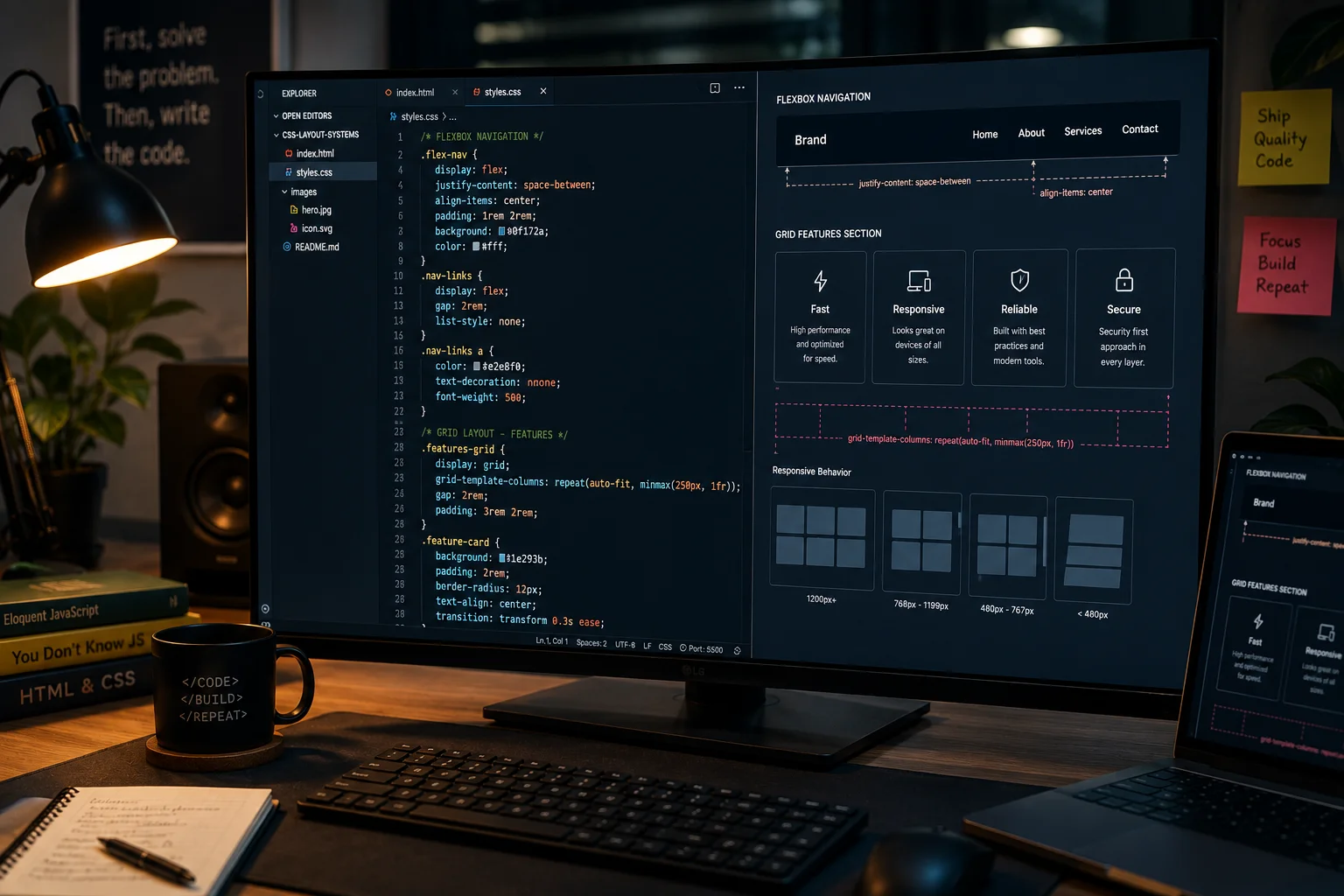
CSS (Cascading Style Sheets) is what transforms a plain HTML document into a visually polished, professionally designed interface. Typography, color, spacing, layout, animation, responsive behavior — all of this is CSS. Many developers underestimate it, assuming it’s purely cosmetic work. In practice, CSS is a sophisticated system with its own inheritance rules, specificity logic, cascade algorithm, and two powerful, modern layout engines.
The two most important layout systems in CSS are Flexbox and CSS Grid. Flexbox is designed for one-dimensional layouts — aligning items horizontally in a row or vertically in a column. Grid is designed for two-dimensional layouts — placing content across both rows and columns simultaneously. Together, they make it possible to build almost any layout you can imagine, and they’ve completely replaced the outdated float-based and table-based layout hacks of the previous era.
Responsive design is not optional — it is a baseline expectation. More than half of all global web traffic comes from mobile devices, and your layouts must adapt gracefully to screens of every size. This is achieved through media queries, fluid units, and a mobile-first design approach.
CSS Topics to Study
- Selectors and specificity — understanding how the cascade determines which styles take priority
- The box model — content, padding, border, margin, and why
box-sizing: border-boxmatters - Positioning — static, relative, absolute, fixed, and sticky, and when to use each
- Flexbox — alignment, direction, wrapping,
justify-content,align-items, gaps - CSS Grid — template areas,
frunits, auto-placement, named lines,minmax() - Responsive design — mobile-first philosophy, fluid units (
%,vw,rem,clamp()) - Media queries — defining breakpoints, min-width vs. max-width approaches
- Animations and transitions —
transition,@keyframes,animation,will-change - CSS custom properties (variables) — design tokens, theming, system-wide consistency
Module 4: JavaScript — The Most Important Language You Will Learn
JavaScript is the programming language of the web. It is the only language that runs natively in every major browser, and over the last decade it has expanded far beyond the browser to power backend servers, mobile applications, desktop software, and command-line tools. According to the 2025 Stack Overflow Developer Survey, 66% of professional developers globally use JavaScript — making it the most widely adopted programming language in the world for the 13th consecutive year.
For full-stack developers, JavaScript is not one language among many. It is the central language of your entire career. You can build the frontend (with React), the backend (with Node.js), and the automation tooling around both — all in JavaScript. That degree of versatility across the entire stack is what makes it the most important investment of your learning time.
JavaScript Fundamentals — Non-Negotiable Starting Points
Master these before touching any framework:
- Variables —
let,const,var, and when to use each one - Functions — declarations, expressions, arrow functions, default parameters
- Arrays and objects — the two fundamental data structures in JavaScript
- Loops —
for,while,forEach,map,filter,reduce - Conditionals —
if/else, ternary operators, switch statements, logical operators
Advanced JavaScript — Where the Real Depth Lives
These concepts separate capable developers from exceptional ones:
- Scope — block scope vs. function scope vs. global scope, and why it matters
- Closures — one of the most powerful and most misunderstood features of the language
- Callbacks — the original pattern for handling operations that take time
- Promises — the modern, composable approach to asynchronous code
- Async/Await — syntactic sugar over Promises that makes async code readable as sequential code
- DOM manipulation — reading and modifying the HTML document structure dynamically with JavaScript
- Event handling — listening for user interactions (clicks, inputs, scrolls) and responding intelligently
- ES6+ features — destructuring, spread/rest operators, template literals, optional chaining, nullish coalescing, modules
Spend more time here than anywhere else. JavaScript mastery is what separates junior developers who need constant guidance from mid-level developers who solve problems independently. The more deeply you understand the language itself — not just a framework built on top of it — the more adaptable you become when the ecosystem changes.
Module 5: Version Control with Git and GitHub
Git is a version control system that records every change made to your code over time. Think of it as an infinitely powerful undo button — combined with a collaboration superpower that lets multiple developers work on the same project without overwriting each other’s work. Every professional development team uses Git. Not most teams — every team. It is a non-negotiable baseline skill.
GitHub is the platform built around Git for hosting repositories and collaborating on code. Your GitHub profile functions as your developer portfolio. Recruiters and hiring managers regularly review GitHub profiles before technical interviews. Consistent commits, clean project documentation, and well-written README files tell a more compelling professional story than a CV alone ever can.
Git and GitHub Skills to Build
- Core commands —
git init,git add,git commit,git push,git pull,git status,git log - Branches — creating isolated lines of development for features, fixes, and experiments
- Merging — combining branches and understanding how to resolve conflicts
- Pull requests — the standard way code is reviewed and discussed before merging in professional teams
- GitHub workflow — forking, cloning, opening issues, basic GitHub Actions for automation
Module 6: Frontend Development and React
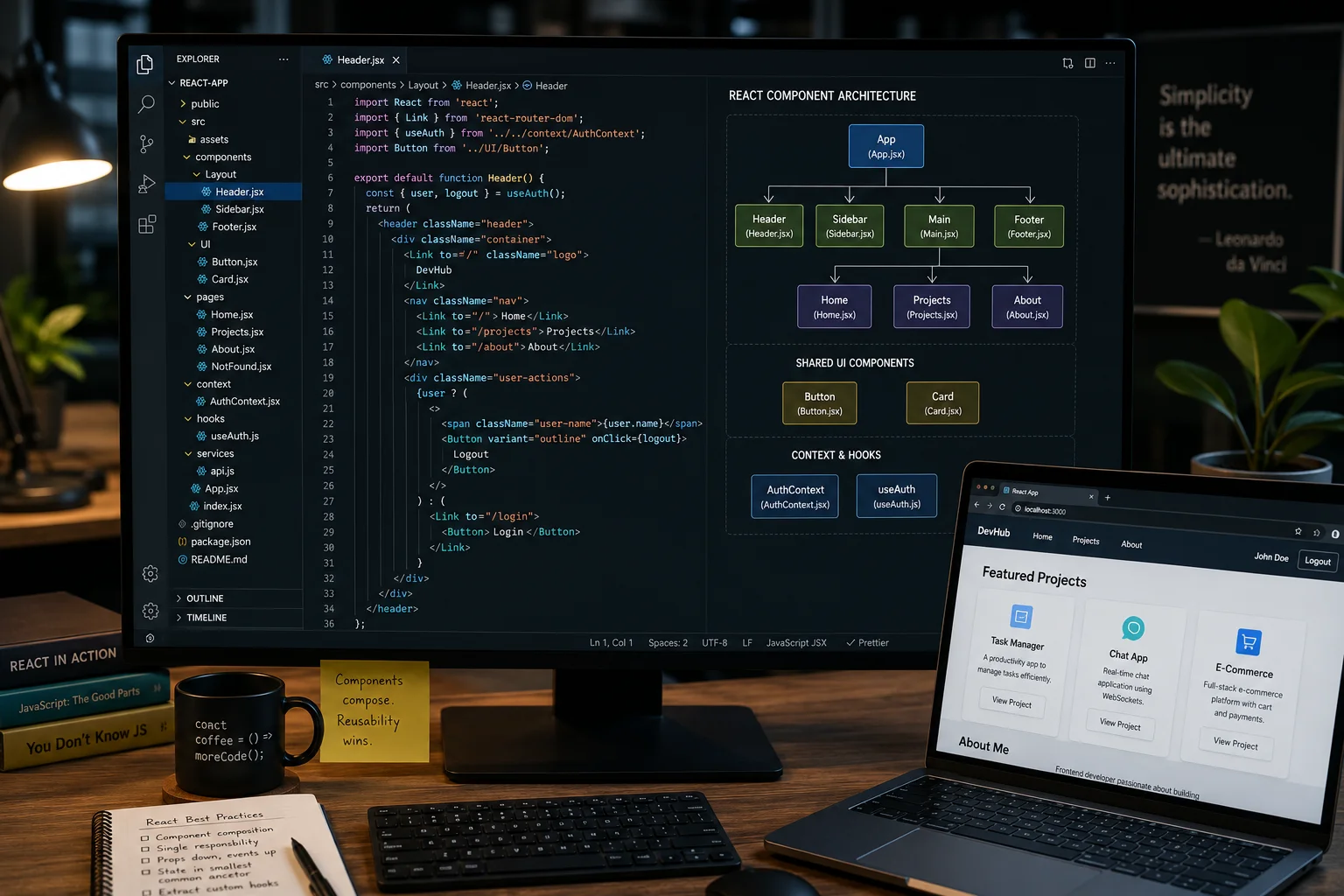
Once your JavaScript foundation is solid, you are ready to learn a frontend framework. Modern web applications are too complex to build efficiently with raw HTML and JavaScript alone. Frameworks solve this by organizing your code into components — self-contained, reusable pieces of UI that each manage their own logic, state, and rendering.
React, created and maintained by Meta, is the dominant framework in the industry today. It uses a component-based architecture and a virtual DOM to efficiently update the interface in response to data changes. React’s ecosystem is enormous: routing libraries, state management tools, animation systems, testing utilities, and a massive community of resources. Learning React opens the door to the majority of frontend job listings available right now.
Core React Concepts to Master
- Components — functional components, JSX syntax, structuring and composing components
- State management —
useState, derived state, understanding when to lift state up - Props — passing data and callbacks from parent to child components
- Routing — using React Router for client-side navigation between pages
- Forms — controlled inputs, validation patterns, and handling form submission
- API integration — fetching data from backend APIs using
useEffect,fetch, and libraries likeaxios
Advanced React — Going Deeper
- Context API — sharing data across many components without prop drilling
- Custom hooks — extracting and reusing stateful logic across multiple components
- Performance optimization —
React.memo,useMemo,useCallback, lazy loading, code splitting
Module 7: TypeScript — The Professional Standard
TypeScript is JavaScript with a static type system layered on top. In plain JavaScript, you can pass a number to a function that expects a string, and the error only surfaces at runtime — sometimes in production, after real users have already encountered the problem. TypeScript catches these type mismatches at the moment you write the code, before anything runs at all.
The 2025 GitHub Octoverse report noted that TypeScript overtook both Python and JavaScript to become the most used language on GitHub as of August 2025. That is a significant milestone. Most modern companies — especially those with large, collaborative codebases — either require TypeScript or are actively migrating to it. Arriving at a job already knowing TypeScript makes you a more competitive and immediately productive candidate.
TypeScript Topics to Learn
- Type annotations —
string,number,boolean,array,object,unknown,never, union types - Interfaces — defining the shape of objects and function signatures with named contracts
- Generics — writing reusable, type-safe functions and React components
- Type narrowing — using type guards and discriminated unions to handle complex types safely
- Utility types —
Partial,Required,Pick,Omit,Record,ReturnType
If you already know JavaScript, TypeScript has a relatively gentle learning curve. You can adopt it incrementally — starting with basic annotations on existing JavaScript code and gradually introducing more advanced features as your confidence grows.
Module 8: Backend Development with Node.js and Express
The backend is everything that happens on the server — processing incoming requests, enforcing business logic, reading and writing to databases, sending responses back to the client. Users never interact with it directly, but every meaningful application depends on it entirely. Without a backend, you can’t save user accounts, process payments, store content, send notifications, or enforce access control.
Node.js is a runtime environment that lets you execute JavaScript on a server, outside the browser. This matters enormously because it means you use the same language on both sides of your application. You don’t switch between JavaScript on the frontend and a different language on the backend. Express.js is the most popular framework built on Node.js — it provides a minimal, clean API for defining routes, handling HTTP requests, and adding middleware functions.
Backend Concepts to Study
- Server architecture — how a Node.js server listens for and processes incoming HTTP requests
- Routing — mapping URL paths and HTTP methods to specific handler functions
- Middleware — reusable functions that process requests before they reach route handlers (logging, authentication, body parsing, error handling)
- Authentication — verifying the identity of users making requests to your server
- Authorization — determining what authenticated users are allowed to access or modify
- Error handling — catching errors gracefully and returning meaningful, structured error responses
- API design — structuring your endpoints, applying naming conventions, designing clean request/response shapes
Module 9: Databases — SQL and NoSQL
Databases are where your application’s data actually lives. Every web application that stores anything — user profiles, posts, products, orders, messages, logs — needs a database. There are two major families of databases, and they solve genuinely different problems. Understanding both makes you a far more capable architect.
SQL Databases — Structured, Relational, and Proven
Relational databases organize data into tables with rows and columns, connected by defined relationships. You query them using SQL (Structured Query Language). The 2025 Stack Overflow Developer Survey confirmed that PostgreSQL is the most popular database environment globally, used by 55.6% of professional developers — a position it has held since 2022. PostgreSQL is your recommended starting point.
Core SQL Concepts to Learn
- Tables and schemas — designing the structure and data types of your tables
- Relationships — one-to-one, one-to-many, and many-to-many relationships, enforced with foreign keys
- Joins — querying across multiple related tables with
INNER JOIN,LEFT JOIN, and others - Indexes — speeding up queries on frequently searched and filtered columns
- Transactions — ensuring multiple related database operations either all succeed or all fail atomically
NoSQL Databases — Flexible and Document-Oriented
NoSQL databases store data as flexible JSON-like documents rather than rigid table rows. MongoDB is the most widely adopted NoSQL database. It’s well-suited to applications where the data structure changes frequently, where you’re prototyping quickly, or where you need to store varied, hierarchical data without a rigid predefined schema.
Core NoSQL Concepts to Learn
- Documents — JSON-like records that hold all fields for a single entity in one place
- Collections — groups of related documents (analogous to SQL tables)
- Schema design — deciding when to embed related data inside a document vs. referencing it separately
Practical recommendation: Learn PostgreSQL first. The skills you develop — writing precise SQL queries, designing normalized schemas, thinking in terms of data relationships — transfer to every other database system you'll ever work with. Add MongoDB as your second database once PostgreSQL is solid.
Module 10: Authentication and Security — The Module Most Beginners Skip
Security is consistently the most neglected area in beginner development education, and it causes the most serious real-world damage. A security vulnerability is not a minor bug — it can mean exposed user passwords, leaked financial data, broken regulatory compliance, and destroyed user trust that takes years to rebuild. The time to learn security is before you build your application, not after an incident forces you to respond to one.
Authentication is the process of verifying who someone claims to be. Authorization is the process of determining what that verified person is allowed to do. These are distinct concepts, and confusing them leads to serious access control vulnerabilities. Both must be understood deeply.
Authentication and Session Management
- Sessions and cookies — the traditional server-side session management model
- JWT (JSON Web Tokens) — stateless tokens for modern, scalable API authentication
- Password hashing — using
bcryptorArgon2to store passwords safely — never in plain text, ever - OAuth 2.0 — letting users authenticate via trusted third parties like Google, GitHub, or Apple
- CORS — Cross-Origin Resource Sharing, controlling which external origins can access your API
Common Security Vulnerabilities You Must Understand
- XSS (Cross-Site Scripting) — attackers inject malicious scripts into your pages through unsanitized user input
- CSRF (Cross-Site Request Forgery) — attackers trick authenticated users into performing unintended actions on your application
- SQL Injection — attackers manipulate database queries through improperly sanitized input fields, potentially reading or destroying your entire database
⚠ Do not skip this module. Security vulnerabilities discovered after launch are exponentially more damaging and harder to fix than those prevented during development. Every application that handles user data needs a developer who understands these risks and designs against them from the start.
Module 11: APIs — How Applications Communicate
APIs (Application Programming Interfaces) are the contracts that define how software systems communicate with each other. When your React frontend sends data to your Express backend, it does so through an API. When your application needs to charge a payment, send an email, verify a phone number, or display a map, it calls third-party APIs. In modern web development, virtually every meaningful action in an application involves an API call.
REST — The Foundation Every Developer Must Know
REST (Representational State Transfer) is the dominant architectural style for web APIs. REST organizes your API around resources — users, posts, products, orders — and uses standard HTTP methods to define operations. GET retrieves data, POST creates it, PUT/PATCH updates it, DELETE removes it. This convention is simple, universally understood, and you will use it in every professional role.
Core API Skills to Develop
- REST architecture — resource-based URL design, proper HTTP methods, meaningful status codes
- CRUD operations — Create, Read, Update, Delete — the four fundamental data operations every API supports
- API testing — using Postman or Insomnia to test and debug endpoints before frontend integration
- API documentation — writing clear Swagger/OpenAPI documentation so your API is usable by others
GraphQL — Advanced API Design
GraphQL is a query language for APIs developed by Meta. Rather than fixed endpoints returning fixed data, GraphQL lets clients request exactly the data they need — nothing more, nothing less. This eliminates both over-fetching (receiving data you don’t need) and under-fetching (needing multiple requests to gather all required data). Master REST thoroughly first, then explore GraphQL as an advanced, powerful alternative.
Module 12: Testing — Writing Code That Proves Your Code Works
Testing is how professional developers ship with confidence. A test is code that runs your application code under controlled conditions and asserts that specific outcomes occur. When you make a change to any part of your application, your test suite tells you within seconds whether anything broke — before a user ever encounters it, and before a bug report appears in your inbox.
There are three primary types of tests that form a complete, balanced testing strategy:
- Unit tests — test individual functions and components in complete isolation, without any external dependencies. They are fast, cheap, and form the foundation of your entire test suite.
- Integration tests — test that multiple parts of your system work correctly together. Slower than unit tests but they catch categories of problems that unit tests cannot detect.
- End-to-end (E2E) tests — simulate real user interactions in an actual browser environment. They click buttons, fill out forms, navigate between pages, and assert on visible results. The most realistic test type, and also the most expensive to write and maintain.
Testing Tools Worth Learning
- Jest — the most widely used JavaScript testing framework, excellent for unit and integration tests across both frontend and backend
- Playwright — Microsoft’s modern E2E testing tool, supporting Chromium, Firefox, and WebKit browsers
- Vitest — a fast, Vite-native testing framework gaining rapid adoption as an alternative to Jest
Module 13: Deployment and DevOps Basics — Shipping Your Application to the World
Writing working code is only half the job. Getting that code running reliably on a server — accessible to real users, performing under load, recovering automatically from failures — is the other half. Understanding how deployment works is what separates a developer who can build things from one who can actually ship them.
The 2025 Stack Overflow Developer Survey found that Docker has moved from a popular tool to a near-universal one, with 71.1% of all developers now reporting its use. Docker containers package your application and all its dependencies into a portable, reproducible unit that runs identically on your laptop, your colleague’s machine, and the production server. This eliminates the classic “it works on my machine” problem entirely and is now considered a baseline skill in most engineering organizations.
DevOps Concepts to Learn
- Linux basics — most production servers run Linux; comfort with the command line is essential for any deployment work
- Environment variables — configuring your application differently for development, staging, and production without hardcoding secrets in your code
- Nginx — using it as a reverse proxy, static file server, and SSL terminator in front of your Node.js application
- CI/CD pipelines — automating the testing and deployment process so every code push triggers an automated pipeline that tests and ships your code
- Docker — containerizing your application for environment consistency and ease of deployment
- Cloud deployment — understanding the options and deploying to real cloud infrastructure
Recommended Platforms to Start With
- Vercel — zero-configuration frontend deployment with excellent performance, ideal for React applications
- Render — straightforward deployment for full-stack Node.js apps, PostgreSQL databases, and background workers
- AWS — the industry-standard cloud platform used by most large companies; worth learning when you’re ready to go deeper into cloud infrastructure
Module 14: System Design — Building Applications That Scale
System design is the practice of thinking at an architectural level — not just “how do I make this feature work?” but “how do I design this entire system so it continues working correctly and efficiently as it grows from 100 to 100 million users?” This is the domain of mid-level to senior engineers, and it’s where the most intellectually interesting engineering problems live.
Even as a junior developer, a foundational understanding of system design makes you more effective immediately. You write code that’s easier to scale later, you understand why your team makes certain architectural decisions, and you ask more insightful questions during technical discussions. These are qualities that accelerate your growth from junior to mid-level.
System Design Concepts to Study
- Caching — storing frequently accessed data in fast in-memory storage (Redis) to dramatically reduce database load and response times
- Load balancing — distributing incoming traffic across multiple server instances so no single server becomes a bottleneck
- Scalability — horizontal scaling (adding more servers) vs. vertical scaling (upgrading existing server hardware), and when each applies
- Database optimization — query optimization, proper indexing strategies, connection pooling, and read replicas for heavy read loads
- Message queues — decoupling services with asynchronous message passing using tools like Redis Queues or RabbitMQ
- Microservices vs. monoliths — understanding the genuine, non-theoretical trade-offs of each architectural approach and when each makes sense
Module 15: Build Real Projects — Where Learning Actually Happens
No volume of tutorials, video courses, or documentation reading can substitute for the experience of building something real and shipping it. Real projects force you to make real decisions under real constraints, encounter errors you’ve never seen before, debug across multiple integrated systems, and develop genuine problem-solving instincts that structured learning simply cannot replicate.
The progression below is intentional. Each project level introduces new technical challenges while building directly on the skills developed in the previous one. Don’t wait until you feel “ready” to start — that feeling never arrives. Start building your first project while you’re still learning JavaScript. Start your second while you’re mid-way through React. Projects and study reinforce each other: what you build reveals exactly what you need to study next.
Recommended Project Progression
| Project | Level | Key Skills Practiced |
|---|---|---|
| 1. To-Do App | Beginner | HTML, CSS, JavaScript, DOM manipulation, local state management |
| 2. Notes App | Beginner | React, forms, CRUD operations, component state, localStorage |
| 3. Expense Tracker | Intermediate | React + backend API, database integration, data aggregation and visualization |
| 4. Blog Platform | Intermediate | Full CRUD, user authentication, rich text content, public and protected routes |
| 5. E-Commerce Website | Intermediate | Shopping cart state, Stripe payment integration, product catalog, admin panel |
| 6. Social Media Clone | Advanced | Real-time features, follow/feed systems, media uploads, performance and scaling |
| 7. SaaS Application | Advanced | Subscription billing, user dashboards, multi-tenant architecture, full CI/CD pipeline |
By the time you have completed a full SaaS application — with authentication, a database, payment integrations, and a deployed, automated pipeline — you have a portfolio piece that covers the breadth of full-stack development. That kind of concrete, deployed evidence of your capabilities is far more persuasive in hiring processes than certificates or course completions.
The Recommended Learning Order for Full-Stack Web Development
Order matters more than speed. Learning React before you understand JavaScript deeply leads to copying code you don’t understand. Learning deployment before you have anything to deploy leads to wasted effort and boredom. Here is the sequence that professional developers consistently recommend — each step builds naturally and logically on the previous one.
- HTML — understand semantic structure before anything else
- CSS — learn to style and lay out pages, including full responsiveness
- JavaScript — master the language deeply before any framework
- Git and GitHub — start version-controlling your code from day one
- React — build interactive frontend UIs with a component architecture
- TypeScript — add type safety to your JavaScript and React code
- Node.js + Express — build backend servers and REST APIs
- PostgreSQL — store and query data with a relational database
- Authentication — add user accounts, sessions, and secure access control
- Testing — write automated tests that protect your code from regressions
- Deployment — ship your applications to real servers in the real world
- System Design — learn to architect applications that can grow and scale
The Employability Fast-Track Stack
If your primary goal is to become employed as a junior full-stack developer as quickly as possible, concentrate on this specific sequence:
HTML → CSS → JavaScript → Git → React → TypeScript → Node.js → Express → PostgreSQL → Authentication → Deployment → Build 3–5 Projects
This combination directly covers the skill requirements listed in the vast majority of junior full-stack developer job postings today. It’s not the only path — but it is the most direct route from zero to employed.
Frequently Asked Questions
How long does it take to become a full-stack web developer?
Most dedicated learners reach a junior, employable level within 9 to 18 months of consistent study and project building. The range is wide because it depends heavily on hours per day, prior programming experience, and the quality of projects completed. Self-taught developers who build and deploy 3–5 real projects — rather than just completing courses — generally move through this timeline faster and have stronger hiring outcomes.
Should I learn frontend or backend first?
Always start with the frontend — specifically HTML, CSS, and JavaScript. Frontend development produces visible, immediate results, which keeps motivation high during the difficult early learning phase. The core concepts you build in the frontend (functions, data structures, asynchronous code, debugging) also transfer directly and substantially to backend development, making the backend significantly easier to learn when you arrive there.
Is JavaScript enough for full-stack development?
Yes — JavaScript and TypeScript together cover the full stack end to end. You use them in the browser for the frontend (with React), on the server for the backend (with Node.js and Express), and for every tool and test script in between. TypeScript overtook Python and JavaScript to become the most-used language on GitHub as of August 2025, according to the GitHub Octoverse report, which confirms just how central this ecosystem has become to professional development.
What is the best database to learn first?
PostgreSQL. It is the most popular database environment among professional developers globally — used by 55.6% of respondents in Stack Overflow’s 2025 survey — and it has held that position since 2022. Learning PostgreSQL gives you deep skills in SQL query writing, relational schema design, and data modeling that transfer to every other database system you’ll ever encounter.
Do I need a computer science degree to become a full-stack developer?
No. A significant and growing portion of working developers are self-taught or bootcamp graduates without traditional CS degrees. What hiring managers evaluate is whether you can build things, solve problems systematically, communicate clearly, and continue learning. A GitHub portfolio of real, deployed projects is consistently more persuasive in hiring processes than an unrelated degree from a university.
Conclusion: The Roadmap Is Clear — Now the Work Begins
Full-stack web development is one of the most durable, high-value skill sets available in the job market today. The demand is genuine and growing. The salaries are strong. And the work itself — building real things that real people use — is deeply satisfying in a way that few careers can match.
Here are the five most important things to carry forward from this guide:
- Follow the order. Each module in this roadmap prepares you for the next. Skipping ahead creates gaps that resurface as confusion later at the worst possible moments.
- Build projects as soon as possible. Don’t wait until you feel ready. Start building while you’re still learning. Reading teaches; building makes it permanent.
- Don’t skip security or testing. These are the modules most beginners skip, and the modules that hiring managers test for most directly in technical interviews.
- Push everything to GitHub. Your commit history and public portfolio are your professional reputation as a developer before you have work experience to point to.
- Learn TypeScript after JavaScript. It is no longer optional for most professional roles. The sooner you add it, the more competitive you become immediately.
The 15 modules in this guide cover everything a junior full-stack developer is expected to know — and much of what an intermediate developer needs as well. Work through them in the recommended order, build real projects alongside your learning, document everything publicly, and deploy what you build. The rest follows from the work itself.