- 1. Introduction to SEO
- 2. What Is Search Engine Optimization?
- 3. Why Is SEO Important?
- 4. How Search Engines Work
- 5. The Main Types of SEO
- 6. Keyword Research
- 7. Understanding Search Intent
- 8. Topic Research, Semantic SEO, and Topical Authority
- 9. Creating an SEO Content Strategy
- 10. How to Write SEO-Friendly Content
- 11. On-Page SEO in Detail
- 12. Technical SEO in Detail
- 13. Off-Page SEO and Link Building
- 14. Local SEO
- 15. Trust, Experience, Expertise, and Reputation
- 16. How to Optimize for AI Search, Answer Engines, and Generative Search
- 17. How to Use AI for SEO Responsibly
- 18. SEO Tools Organized by Purpose
- 19. How to Measure SEO Performance
- 20. How to Conduct a Complete SEO Audit
- 21. SEO Strategy for a New Website
- 22. How to Improve SEO on an Existing Website
- 23. Common SEO Mistakes and How to Correct Them
- 24. White-Hat, Black-Hat, and Risky SEO
- 25. Fifteen Common SEO Myths
- 26. The Future of SEO: Evidence and Cautious Predictions
- 27. A Three-Month Beginner SEO Action Plan
- 28. Final SEO Checklist Before Publishing or Updating a Page
- 29. Frequently Asked Questions About SEO
- 1. What does SEO mean?
- 2. How does SEO work?
- 3. Is SEO free?
- 4. How long does SEO take?
- 5. Can I do SEO myself?
- 6. What are the main types of SEO?
- 7. What is the difference between SEO and paid search?
- 8. What is technical SEO?
- 9. What is on-page SEO?
- 10. What is off-page SEO?
- 11. Are keywords still important?
- 12. How many keywords should one page target?
- 13. Does AI-generated content rank?
- 14. How can my content appear in AI search?
- 15. Are backlinks still important?
- 16. Does website speed affect SEO?
- 17. What is structured data?
- 18. How often should content be updated?
- 19. Which SEO tools should beginners use?
- 20. Can SEO guarantee first position?
- 30. Beginner-Friendly SEO Glossary
- 31. Conclusion: Build SEO Around People, Evidence, and Continuous Improvement
- Part 7: Internal and External Linking Plan
- Part 8: Visual Content Plan
- Part 9: Structured Data Template
- Part 10: Publishing Checklist
- Part 11: Content-Cluster Recommendations
- References
1. Introduction to SEO
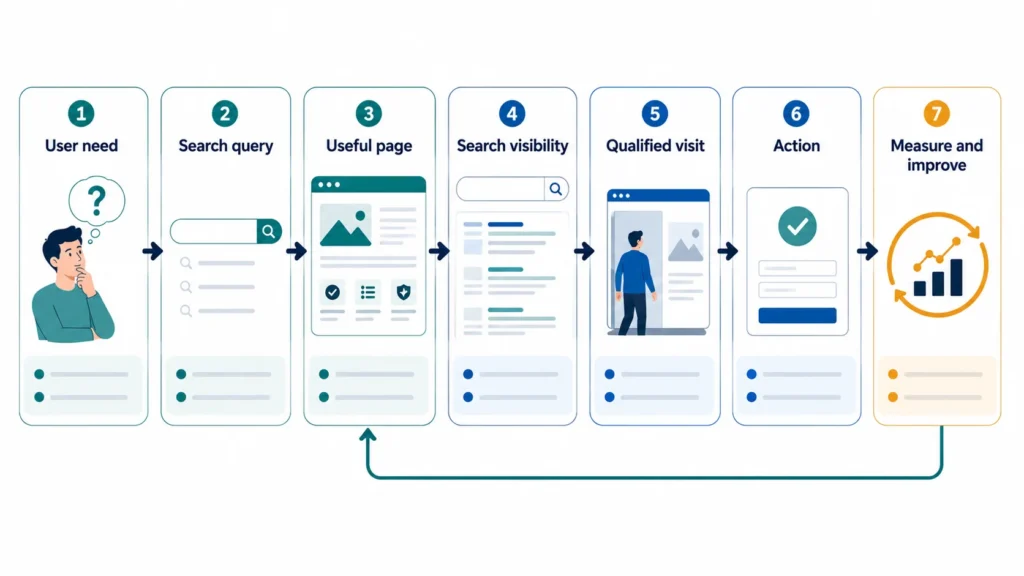
Imagine an excellent shop with no sign, map listing, or road leading to it. Few people will find it. Websites face the same problem. People search for answers, places, products, comparisons, and help; SEO makes suitable pages discoverable when those needs arise.
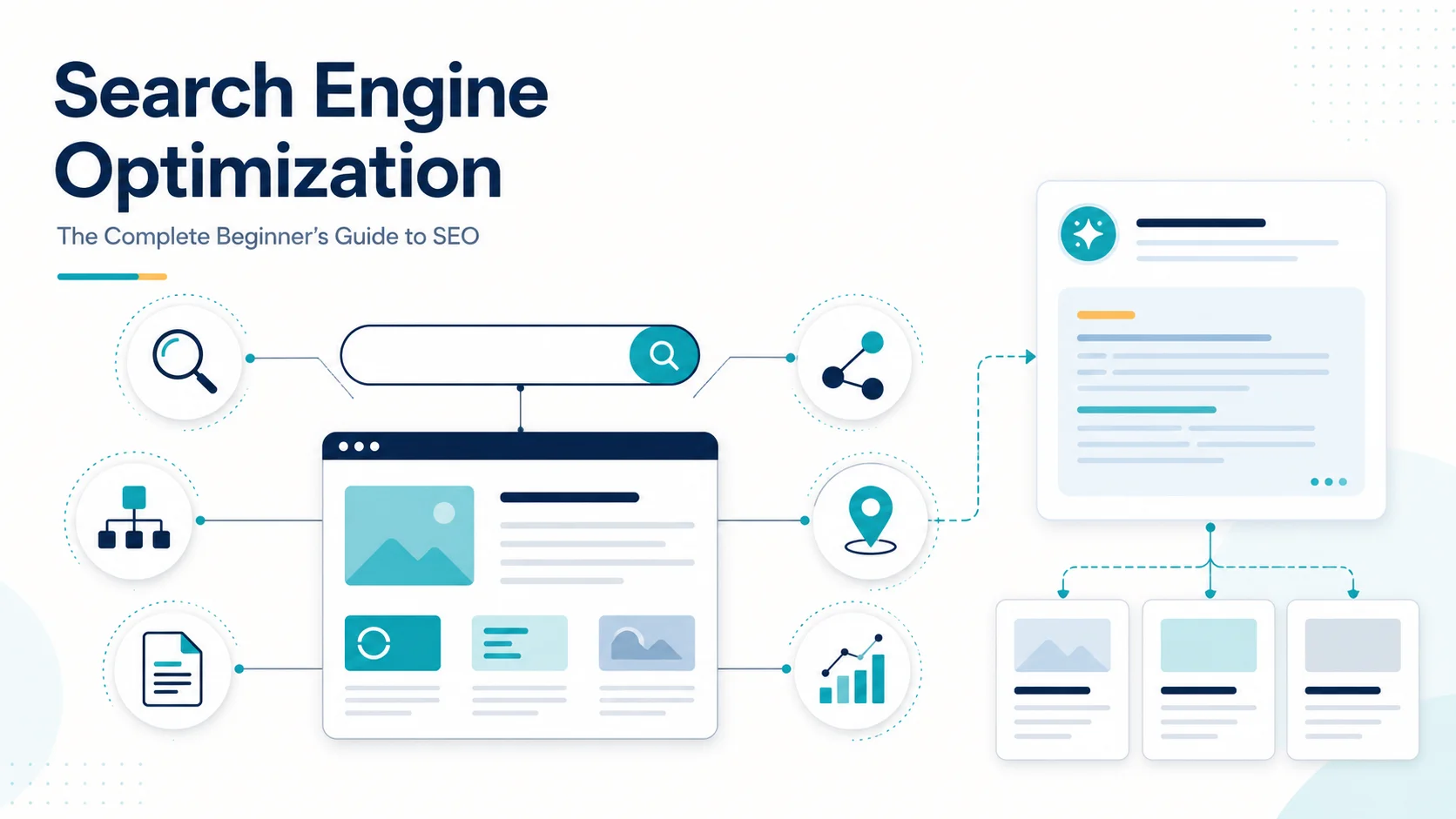
What is SEO? Search engine optimization (SEO) is the practice of improving a website so search engines can find, understand, and present its useful pages to people making relevant searches. It combines audience research, content, website structure, technical improvements, and reputation building to earn visibility in unpaid search results.
Students, local organizations, shops, creators, marketers, owners, and developers all benefit: the goal is qualified discovery, not a larger traffic number alone. This guide covers how search works, SEO types, keywords and intent, content, on-page and technical work, links, local visibility, and trust.
SEO is a long-term process. Search engines do not guarantee crawling, indexing, rankings, or clicks. Outcomes depend on relevance, competition, quality, access, reputation, user needs, and time. SEO improves the chance of useful visibility; it cannot promise first position.
2. What Is Search Engine Optimization?
SEO stands for search engine optimization. In simple terms, it means making useful web content easier for both people and search engines to discover and understand.
A professional definition is broader: SEO matches audience demand with useful, technically accessible content, communicates its meaning, and develops the reputation needed to compete organically. It connects:
- what a person needs;
- what a page genuinely provides; and
- what a search engine can discover, interpret, and confidently present.
SEO is not algorithm manipulation. Deceptive practices can violate Google’s spam policies. Sustainable SEO improves the website.
Organic results, paid results, and related marketing channels
Organic results are unpaid listings. Paid results are auction-based advertisements labelled as ads or sponsored. Google does not accept payment for more crawling or higher organic ranking, according to its Search guide.
| Discipline | Main purpose | How visibility is obtained | What happens when spending stops? |
|---|---|---|---|
| SEO | Earn relevant organic visibility | Useful content, technical quality, clear structure, and reputation | Existing pages may continue to perform, but maintenance is still needed |
| SEM | Usually a broad term for search marketing; in practice, often used for paid search | SEO, paid search, or—depending on the speaker—paid search alone | Depends on the included channel |
| PPC | Buy clicks through advertisements | Advertiser bids and platform ad systems | Paid traffic normally stops |
| Social media marketing | Reach and engage audiences on social platforms | Organic posts, communities, creators, or paid social ads | Organic reach may remain; paid reach stops |
| Content marketing | Educate, attract, or convert an audience through useful content | Search, email, social, direct visits, referrals, and other distribution | Valuable assets can keep working, but need distribution and updates |
SEO and content marketing overlap. Content marketing plans useful material and distribution; SEO adds search demand, crawlability, result presentation, internal links, and measurement. Product pages need SEO without being blog posts, while newsletters can succeed without search intent.
3. Why Is SEO Important?
SEO can create visibility when a relevant need is expressed. Searches such as “emergency plumber near me” or “waterproof hiking shoes size 9” reveal a goal.
When it is aligned with the organization’s purpose, SEO can support:
- discoverability, brand awareness, and content or educational reach;
- relevant visits from people researching a problem;
- enquiries, subscriptions, sales, bookings, donations, or applications;
- local visibility in Search and Maps;
- trust through accurate, well-sourced information;
- customer research by revealing the language and questions an audience uses;
- a durable digital presence that reduces—but rarely removes—dependence on advertising.
SEO is not free: it needs time and may need experts, writers, editors, developers, design, outreach, analytics, and tools. Nor is all traffic valuable; a few suitable prospects can outperform thousands of irrelevant visits.
Consider a hypothetical accounting firm serving small businesses in Pune. A generic article about “money” might attract worldwide student traffic but no enquiries. A clear service page for “GST filing for small businesses in Pune,” supported by accurate explanatory guides, a legitimate Business Profile, reviews, and fast mobile pages is more likely to reach the intended audience. The firm should measure qualified calls and consultation requests, not celebrate sessions alone.
Timelines vary by site and market; no fixed deadline is defensible. Repeat research, implementation, measurement, and improvement.
4. How Search Engines Work
A search engine discovers pages, processes and stores eligible content, retrieves query candidates, ranks them, and presents results. Google groups this into crawling, indexing, and serving; this model separates seven activities:
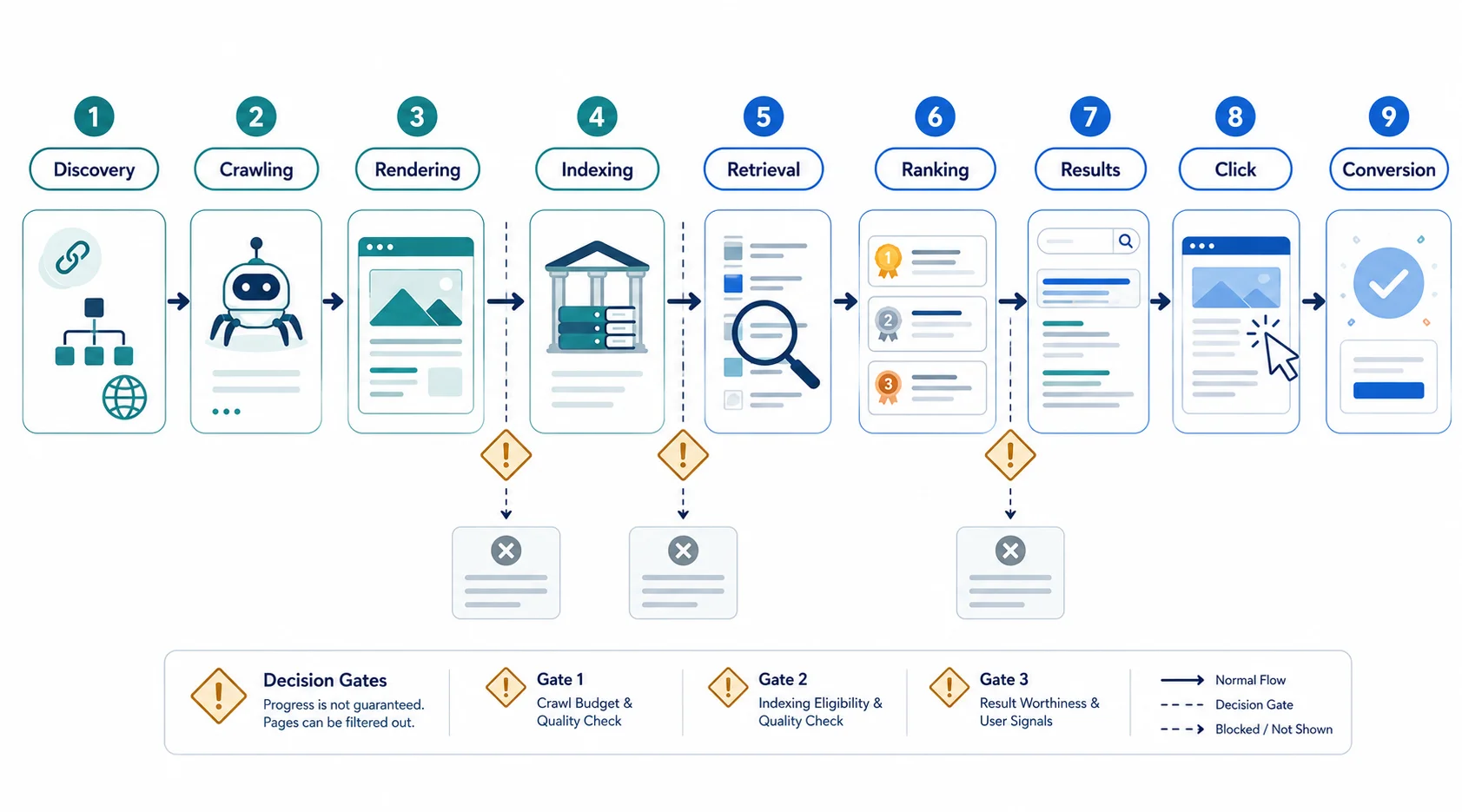
- Discovery: Learn a URL from a link, sitemap, earlier crawl, or other source.
- Crawling: Googlebot, Bingbot, or another crawler requests allowed resources.
- Rendering: Process HTML, CSS, and JavaScript like a browser.
- Indexing: Analyze content, signals, and duplicates; possibly store a canonical version.
- Retrieval: Find indexed candidates for a query.
- Ranking: Order eligible candidates for relevance and quality.
- Presentation: Build results with listings, snippets, rich results, maps, panels, images, video, shopping, or AI experiences as appropriate.
A useful—but imperfect—library analogy
In a library analogy, discovery hears a book exists, crawling obtains it, rendering opens special pages, indexing catalogues it, retrieval finds candidates, and ranking orders them. Unlike books, web pages change, duplicate, depend on scripts, vary by context, or disappear.
What can affect retrieval and ranking?
Systems consider query meaning, relevance, quality, context, freshness, language, location, and device. Personalization exists, but results are not necessarily unique for every person. “Football results” needs freshness; “how photosynthesis works” may not.
Features follow intent: “coffee near me” may show maps, a knot tutorial may show video, and a product query merchant information. Structured data can create rich-result eligibility, never a guaranteed display.
Four distinctions every beginner should remember
| Stage | What it means | What it does not mean |
|---|---|---|
| Crawled | A crawler fetched the URL | The page was accepted into the index |
| Indexed | Information about a page is stored and eligible for retrieval | The page will rank for a desired query |
| Ranked | The page appears in some position for a query and context | A searcher will click it |
| Traffic | A person visited the site | The visit produced a useful outcome |
Conversions are defined outcomes such as sales, calls, registrations, or downloads. Measure the whole chain from access to value.
5. The Main Types of SEO
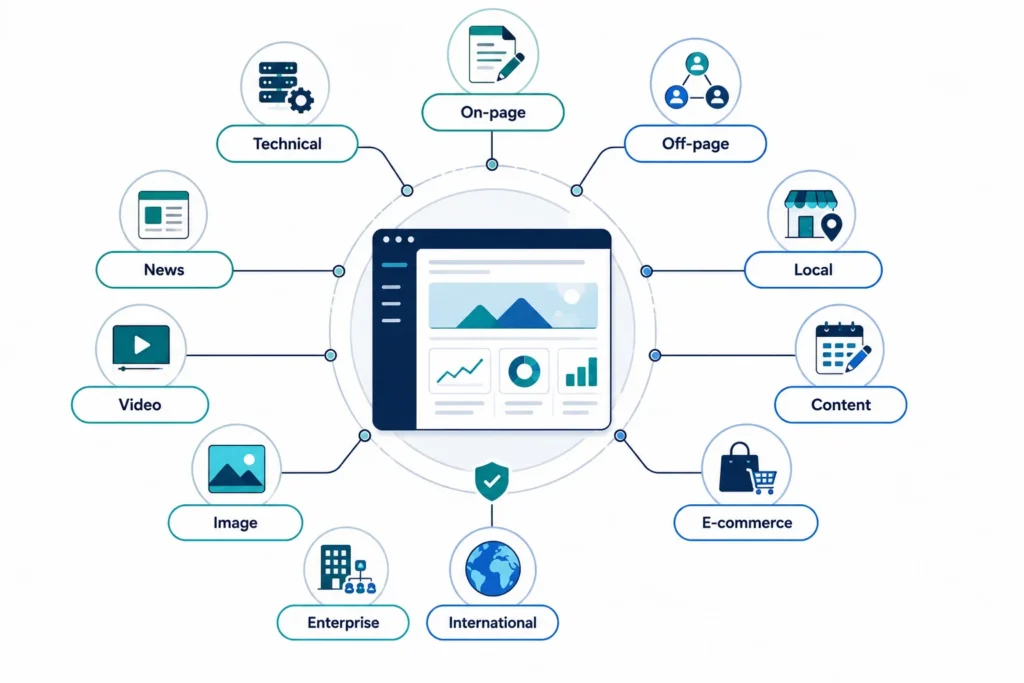
The types of SEO are connected workstreams, not separate algorithms. Content and on-page work make pages useful; technical SEO makes them accessible; off-page work develops recognition; specialist areas address location, commerce, language, media, news, or scale. See RC Blog’s guide to the types of SEO.
The following compact field guide gives each workstream’s purpose, implementation, example, common mistake, tools, and mini-checklist.
| Type | What it is, why it matters, and when it is needed | How to do it and simple example | Common mistake, useful tools, and mini-checklist |
|---|---|---|---|
| On-page SEO | Improving one page’s intent match and clarity; every indexable page needs it. | Use an accurate title, H1, URL, answer-first introduction, headings, natural terms, images, references, internal links, and CTA. Example: a yoga page answers level, schedule, price, and booking. | Mistake: keyword repetition. Tools: results, Search Console, browser/CMS preview. Check: clear purpose, useful answer, descriptive links, accessible media. |
| Technical SEO | Making a site accessible, renderable, indexable, and efficient; critical on new, redesigned, JavaScript-heavy, or large sites. | Maintain servers, crawlable links, status codes, canonicals, sitemaps, mobile parity, and speed. Example: control endless product-filter URLs. | Mistake: optimizing a blocked page. Tools: Search Console, Bing tools, PageSpeed Insights, crawler. Check: 200, crawlable, indexable, canonical, linked, mobile usable. |
| Off-page SEO | Developing independent reputation and references. | Earn editorial links and mentions with useful resources, research, PR, partnerships, communities, and citations. Example: a university cites an open calculator. | Mistake: buying links. Tools: webmaster and backlink tools. Check: relevance, editorial reason, real audience, transparent relationship. |
| Local SEO | Visibility for organizations serving a place or receiving customers. | Maintain eligible profiles, accurate contact details, categories, hours, services, photos, reviews, local pages, and citations. Example: a dentist’s profile and location page agree. | Mistake: fake locations or stuffed names. Tools: Business Profile, Bing Places, Maps. Check: eligible, verified, accurate, reviews answered, useful page. |
| Content SEO | Planning, connecting, updating, and measuring useful content. | Research needs and intent; choose a format; add original value; link, distribute, measure, update, or consolidate. Example: connect a tax guide, calculator, comparison, and product. | Mistake: shallow volume publishing. Tools: Trends, Search Console, analytics, calendar. Check: audience, evidence, originality, owner, links, review date, outcome. |
| E-commerce SEO | Optimizing categories, products, data, and shopping architecture. | Improve product/category information; manage filters, variants, canonicals, stock, reviews, merchant facts, and truthful markup. Example: a discontinued item offers useful alternatives. | Mistake: copied descriptions. Tools: Merchant Center, Search Console, crawler. Check: unique value, accurate price/stock, controlled filters. See Google’s ecommerce guidance. |
| International SEO | Serving genuine language or regional versions. | Localize content; choose consistent URL structures; use reciprocal hreflang, locale links, and aligned canonicals. Example: India and UK pages use local currency and delivery terms. | Mistake: forced IP redirects. Tools: Search Console, validators, crawler. Check: accurate locale, self-canonical, reciprocal hreflang, visible selector. |
| Image SEO | Making useful images discoverable, fast, contextual, and accessible. | Use suitable formats, responsive sizes, compression, filenames, nearby text, captions, alt text, and image sitemaps when needed. | Mistake: stuffed alt text. Tools: PageSpeed Insights, accessibility audit. Check: right dimensions/format, responsive, contextual, meaningful or empty decorative alt. See image best practices. |
| Video SEO | Helping systems understand a watchable video and landing page. | Use a stable watch page, accurate title, thumbnail, description, transcript/captions, accessible player, valid VideoObject, and sitemap when useful. | Mistake: a hidden secondary video. Tools: YouTube Studio, Search Console, Rich Results Test. Check: prominent, playable, reachable thumbnail, accurate metadata. See video guidance. |
| News SEO | Supporting timely, transparent journalism—not every updated blog. | Publish original reporting with headline, byline, publisher, dates, sources, crawlable media, corrections, and an eligible news sitemap. | Mistake: changing dates without a real update. Tools: Search Console, analytics. Check: news purpose, transparency, stable URL, correction process. |
| Enterprise SEO | Coordinating large sites, templates, teams, markets, and governance. | Set template rules, automated tests, approvals, monitoring, change logs, and backlogs. Example: prevent a CMS release adding noindex at scale. | Mistake: page fixes instead of template fixes. Tools: crawlers, logs, warehouse, tickets. Check: owner, scope, risk, test, release control, alerts. |
A bakery may prioritize local, on-page, mobile, and reputation work; a global marketplace may need ecommerce, international, JavaScript, and enterprise governance. Match effort to the real site.
6. Keyword Research
Keyword research is the process of learning how an audience expresses its needs in search, then deciding which needs your website can answer well. It is not a hunt for the phrase with the largest number beside it.
A search query is a person’s exact input. A keyword is the term or topic an SEO professional analyzes and maps. One keyword can represent many queries.
Keyword types beginners should know
- Seeds are starting topics. Head/short-tail terms are broad, such as “CRM.” Long-tail terms are specific, such as “CRM for a five-person architecture firm”; specificity matters more than word count.
- Informational terms seek knowledge; navigational terms seek a known page; commercial-investigation terms compare; transactional terms aim to act.
- Branded terms name an organization or product; non-branded terms do not. Local terms imply a place, while question terms ask who, what, when, where, why, or how.
- Related concepts and entities are the people, places, products, standards, and subtopics needed for an accurate explanation—not words to insert mechanically.
How to judge a keyword opportunity
| Measure | What it can tell you | Important limitation |
|---|---|---|
| Search volume | Estimated demand by place and period | May group variants and does not equal clicks |
| Keyword difficulty | A tool’s ranking-competition estimate | Proprietary, not an official search-engine score |
| Competition | Strength of results, or advertiser competition in ad tools | Ad competition is not organic difficulty |
| Traffic potential | Demand across queries one strong page may satisfy | A forecast, not a promise |
| Business/conversion value | Fit with goals and likelihood of a useful action | Relevance can matter more than volume |
| Seasonality/trends | How demand changes over time | A spike may not support evergreen content |
Do not reject a “zero-volume” query automatically. Tools may lack data for new, local, or specialist needs. A recurring customer or support question may still deserve an answer.
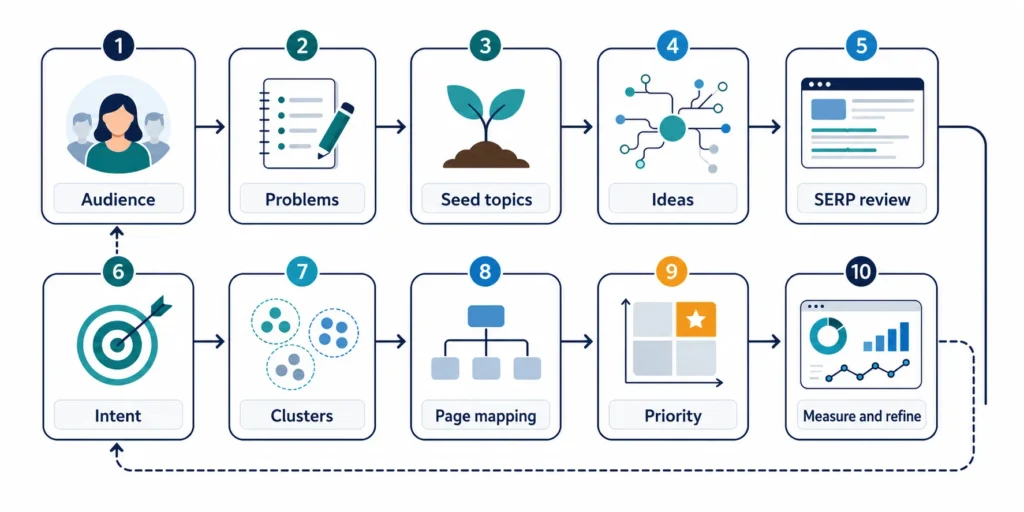
How to perform keyword research step by step
- Define the audience, existing knowledge, location, and desired outcome.
- Gather problems from interviews, support, reviews, site search, sales, and communities.
- Turn products, services, tasks, problems, and outcomes into seed topics.
- Collect ideas from suggestions, related searches, Search Console, Trends, tools, competitors, and experts.
- Identify what the searcher wants to know or do.
- Review results for page type, format, angle, features, depth, and freshness.
- Assess relevance, credibility, competition, and the ability to add value.
- Cluster queries sharing one underlying intent.
- Map each cluster to one coherent existing or planned page.
- Prioritize audience value, business value, competitiveness, effort, urgency, and dependencies.
- Calendar the format, evidence, owner, deadline, links, and review date.
- Refine using queries, impressions, clicks, engagement, conversions, and feedback.
Keyword clustering groups queries that can be satisfied by one page. Keyword mapping assigns those clusters to existing or planned URLs. Keyword cannibalization occurs when multiple pages compete confusingly for the same need; it is a diagnosis, not simply the fact that two pages mention the same phrase. Resolve genuine overlap by differentiating intent, consolidating pages, improving internal links, or redirecting a retired URL when appropriate.
A realistic example
Suppose an online course provider starts with the seed “Excel training.” Research reveals “Excel course for beginners,” “learn pivot tables,” “Excel certification course,” and “Excel corporate training.”
These need different pages: a pivot-table tutorial, a certification course page, and a corporate-training service page. A beginner hub can connect them. Measure course enquiries rather than forcing every term into one article.
Free and paid keyword tools
- No-cost first-party: Search Console shows many queries producing impressions or clicks for your verified property, subject to privacy/reporting limits. Google Trends shows relative interest, regions, and seasonality—not absolute volume. Bing Webmaster Tools provides site and keyword research features.
- Account-based ad planning: Keyword Planner supplies ideas and ad forecasts; Google says account setup and billing information may be required. Treat its advertising estimates as directional SEO evidence.
- Paid: Ahrefs Keywords Explorer and Semrush Keyword Magic Tool offer proprietary databases, volume/difficulty estimates, SERP or intent analysis, and grouping under applicable plans. They save time but do not replace intent review.
7. Understanding Search Intent
Search intent is the purpose behind a query. Even an excellent page can struggle when it gives the wrong kind of answer.
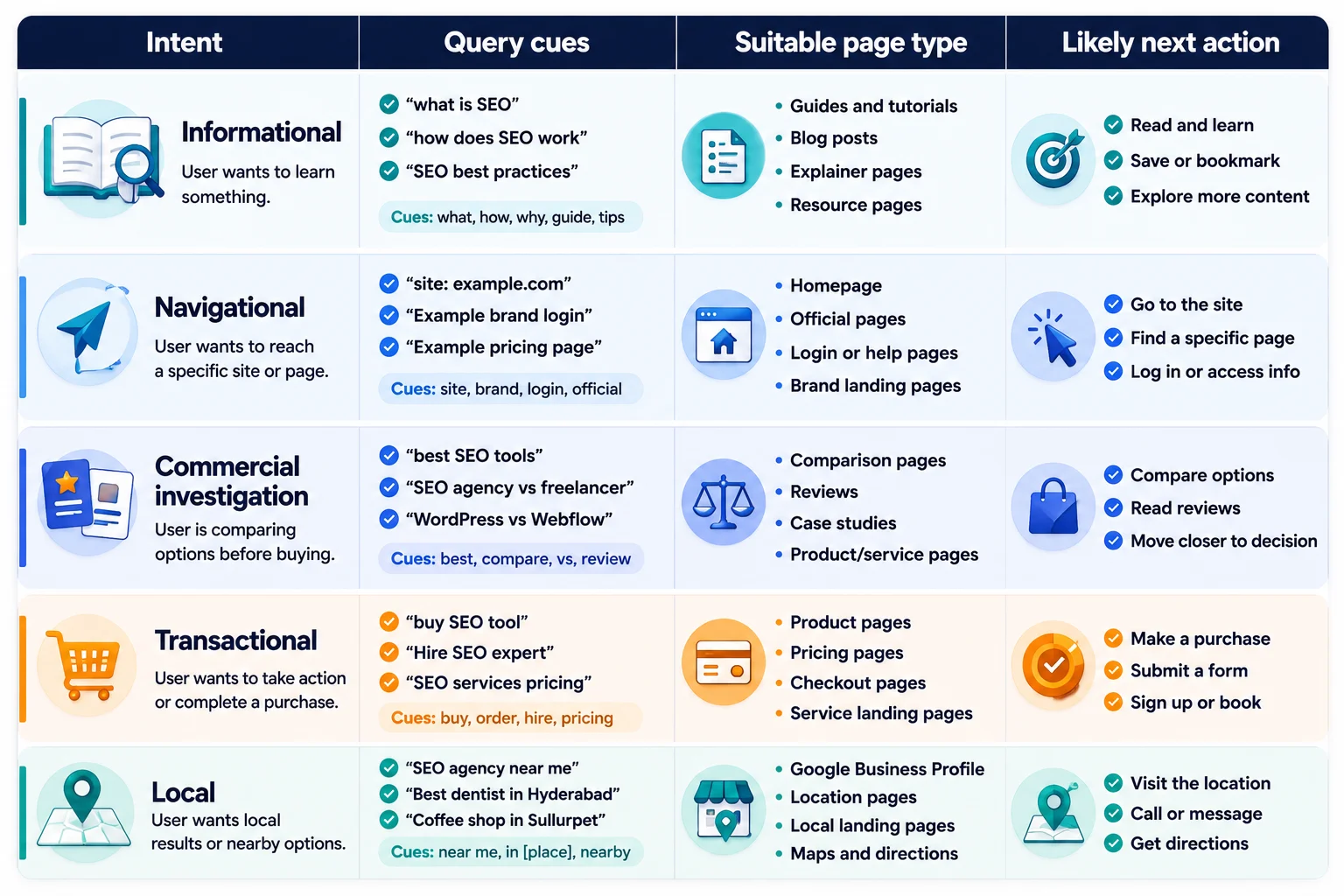
The main intent categories are:
- Informational: learn or solve (“how to clean a camera sensor”).
- Navigational: reach a known page (“Canva login”).
- Commercial investigation: compare (“best restaurant payroll software”).
- Transactional: act (“buy noise-cancelling headphones”).
- Local: find something nearby (“24-hour pharmacy near me”).
Intent can mix: “MacBook Air” may mean specifications, reviews, support, or purchase; “best dentist” is local and commercial.
How to analyze intent
Read the query, then inspect current results in the target country/device for:
- ranking page types: guide, category, product, tool, video, location page, forum, or homepage;
- dominant format: steps, list, comparison, definition, calculator, or short answer;
- angle: beginner, budget, professional, fast, current year, local, or evidence-based;
- expected depth and freshness;
- result features such as maps, images, videos, shopping, or featured snippets;
- likely journey stage: discovery, comparison, action, or support.
A matching result for “calculate paint needed” offers a formula, calculator, and example; a sales-only paint page does not. “Buy office chair” needs browsable products, not chair history. Results reveal likely intent but are not a template to copy.
8. Topic Research, Semantic SEO, and Topical Authority
Topic-focused SEO explains connected ideas instead of creating a page for every keyword variation. A mortgage guide naturally needs principal, interest, term, deposit, affordability, and repayment.
An entity is a distinct person, company, place, product, or concept. Semantic relevance comes from accurate relationships, not inserted “related words.”
A pillar gives an overview; supporting articles answer narrower intents; a topic cluster connects them with descriptive links.
How to create a topic map
- Define the audience and the genuine subject area in which the site can help.
- Identify the main tasks, questions, decisions, entities, and journey stages.
- Group needs by shared intent and decide what deserves a page versus a subsection.
- Audit existing URLs; keep, improve, merge, redirect, or create only where justified.
- Assign a pillar and supporting resources, then map two-way contextual links.
- Record evidence, expert ownership, conversion path, publication priority, and update cadence.
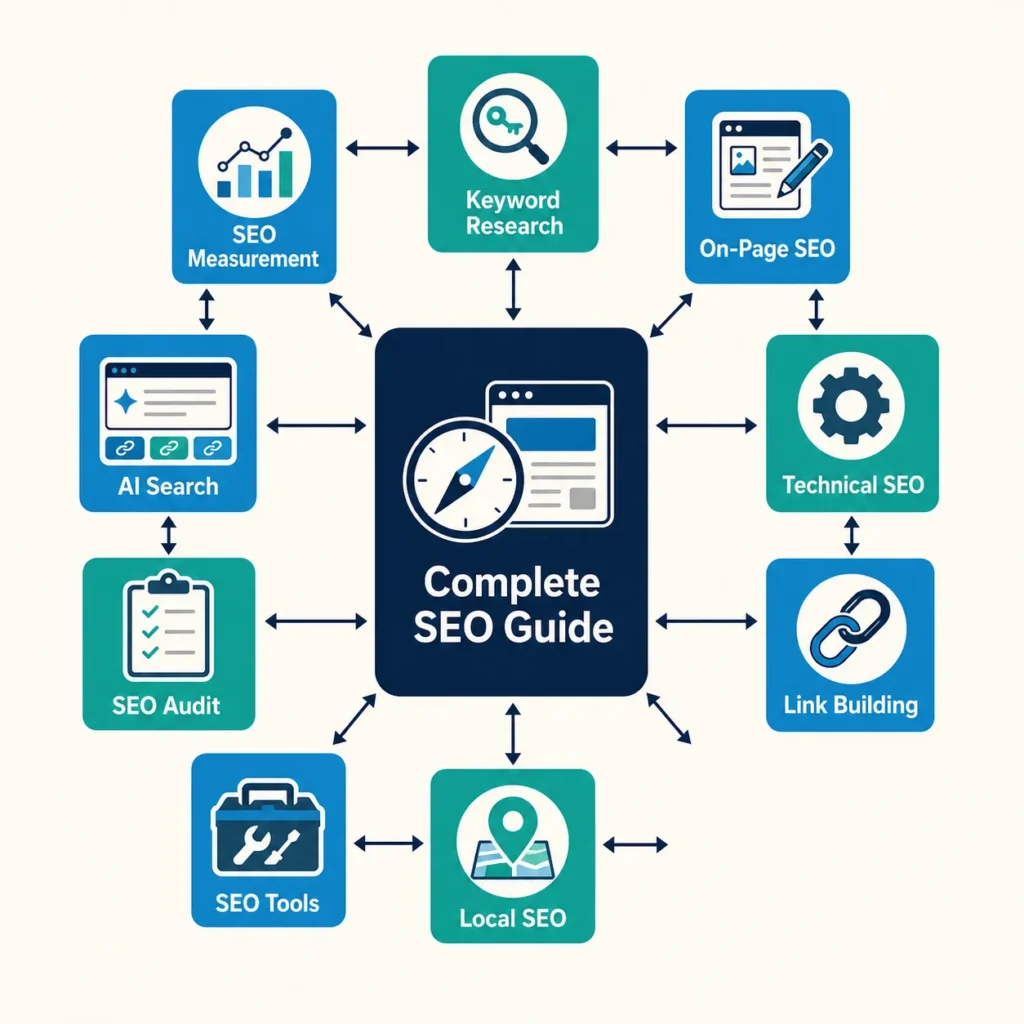
This SEO pillar can connect keyword-research, on-page, technical, ethical link-building, local, tools, audit, AI-search, and measurement guides, each linking back and to close neighbours.
Page volume alone does not create authority. Depth, originality, coherence, expertise, reputation, maintenance, and usefulness matter. Third-party scores are not search-engine metrics. See RC Blog on domain authority, Google visibility, and AI search, and evaluate scores beside real outcomes.
9. Creating an SEO Content Strategy
An SEO content strategy defines the audience needs, purpose, assets, owners, and measures. Keywords without goals, resources, or maintenance are not a strategy.
The complete strategy process
- Define organizational goals and measurable outcomes.
- Describe priority audiences, knowledge, locations, and constraints.
- Gather recurring problems through direct research.
- Research demand, language, seasonality, and existing performance.
- Analyze competitors and worthwhile gaps.
- Select topics fitting the organization and its expertise.
- Map them to awareness, evaluation, action, onboarding, and retention.
- Choose the format completing each task.
- Build topic clusters and internal-link routes.
- Prioritize impact, confidence, effort, urgency, and dependencies.
- Calendar briefs, evidence, owners, and deadlines.
- Assign experts, writers, editors, designers, developers, and approvers as needed.
- Set accuracy, sourcing, originality, accessibility, tone, and update standards.
- Publish after editorial and technical checks.
- Distribute through suitable email, social, communities, partners, PR, sales, or paid channels.
- Measure visibility, behaviour, conversions, assisted value, and feedback.
- Update, differentiate, consolidate, redirect, or retire from evidence.
Choose the format that fits the task
| Format | Best use |
|---|---|
| Guide or tutorial | Explain a broad subject or a repeatable process |
| Definition | Resolve a focused “what is” question quickly |
| Comparison | Help readers evaluate meaningful differences between options |
| Case study | Show a real method and result with transparent evidence |
| Original research | Add new data or analysis that others can reference |
| Template or checklist | Help a reader complete a repeatable task |
| Tool or calculator | Produce a useful output from user input |
| Product or category page | Support purchase and browsing intent |
| Location page | Explain a real location’s services, people, proof, and logistics |
| Video | Demonstrate motion, software, a process, or a visual subject |
| Infographic | Clarify a relationship that is genuinely easier to see than read |
| FAQ section | Resolve important follow-up questions visible on the page |
FAQ is a content format, not a rich-result tactic. A tool must be useful, and a case study needs real evidence and method.
[AUTHOR: Add one example showing how a real RC Blog topic moved from audience question to brief, publication, internal links, and measured outcome.]
10. How to Write SEO-Friendly Content
SEO-friendly content gives the intended reader a trustworthy answer that search engines can access and understand. Write for people, then improve discovery.
A practical writing workflow
- Choose one focused topic that supports an audience and organizational goal.
- Identify intent and follow-up questions.
- Research primary sources and their dates.
- Review results for expectations, never wording to copy.
- Find missing explanations, evidence, examples, or original value.
- Outline from direct answer to detail and action.
- Write an answer-first introduction.
- Explain enough to complete the task.
- Add examples; label hypotheticals.
- Evidence changeable or consequential claims.
- Add first-hand experience only when real.
- Improve readability with plain language and useful structure.
- Use descriptive, natural headings.
- Add contextual internal and authoritative external links.
- Optimize images for size, format, speed, context, and accessibility.
- Add supported structured data matching visible content.
- Edit for accuracy, value, originality, tone, and repetition.
- Publish, test, and monitor discovery and outcomes.
- Update when facts, products, intent, or needs change.
What creates original value?
Original value may be first-hand use, expert commentary, screenshots, data, research, templates, frameworks, case studies, demonstrations, comparisons, or exceptional clarity. Never invent experience; disclose expert review.
Comprehensive content covers what the reader needs; bloated content repeats, wanders, or stretches a simple task. Length follows intent: a converter needs little explanation, while a safe migration guide needs depth.
Google’s people-first content guidance recommends original, substantial material created primarily to help an intended audience. Use that principle as an editorial test: would this page still be worth publishing if search traffic did not exist?
11. On-Page SEO in Detail
On-page SEO makes an individual page’s purpose, information, and next step clear. It starts with intent and content quality; metadata and keyword placement cannot rescue an irrelevant answer.
SEO titles
Write a distinct HTML title that accurately sets the click expectation. Place the topic early when natural, add the brand when useful, and avoid boilerplate, vague labels, or exaggerated promises. No character count is a ranking rule: display space varies, and Google may create another title link from headings, page text, anchors, or other sources. Follow Google’s title-link guidance and put useful information first.
Five suitable title options for this guide are:
- Search Engine Optimization: A Complete Beginner’s Guide to SEO
- What Is SEO? How Search Engine Optimization Works
- SEO for Beginners: Strategy, Content, Technical SEO, and More
- Learn SEO Step by Step: A Practical Search Optimization Guide
- The Complete SEO Guide: From Keywords to Technical Foundations
Meta descriptions
A meta description summarizes a page for searchers. It is not a guaranteed ranking boost, and Google may use page content instead. A clear summary can support clicks. Google’s snippet guidance recommends unique descriptions, not keyword lists.
Three options:
- Learn how SEO works, research keywords, create useful content, fix technical issues, build trust, and measure results with this practical beginner’s guide.
- New to SEO? Understand crawling, indexing, search intent, on-page optimization, technical SEO, links, local visibility, tools, and a clear way to start.
- A plain-English guide to search engine optimization for students, business owners, creators, marketers, and developers—with examples and actionable checklists.
Recommended slug: /search-engine-optimization/
Use readable lowercase words and hyphens. Do not change a working URL merely to shorten it; update links and redirect when a justified change occurs.
Headings, introductions, and natural keyword use
Use one H1, H2s for major sections, H3s for subsections, and H4s only when needed. Headings aid organization and accessibility, not keyword repetition. An introduction should confirm the need, answer early, define scope, and preview the outcome. Include the topic naturally in the title, H1, introduction, relevant headings, body, URL, image context, and anchors where appropriate. Reject fixed density targets and keyword stuffing.
Internal and external links
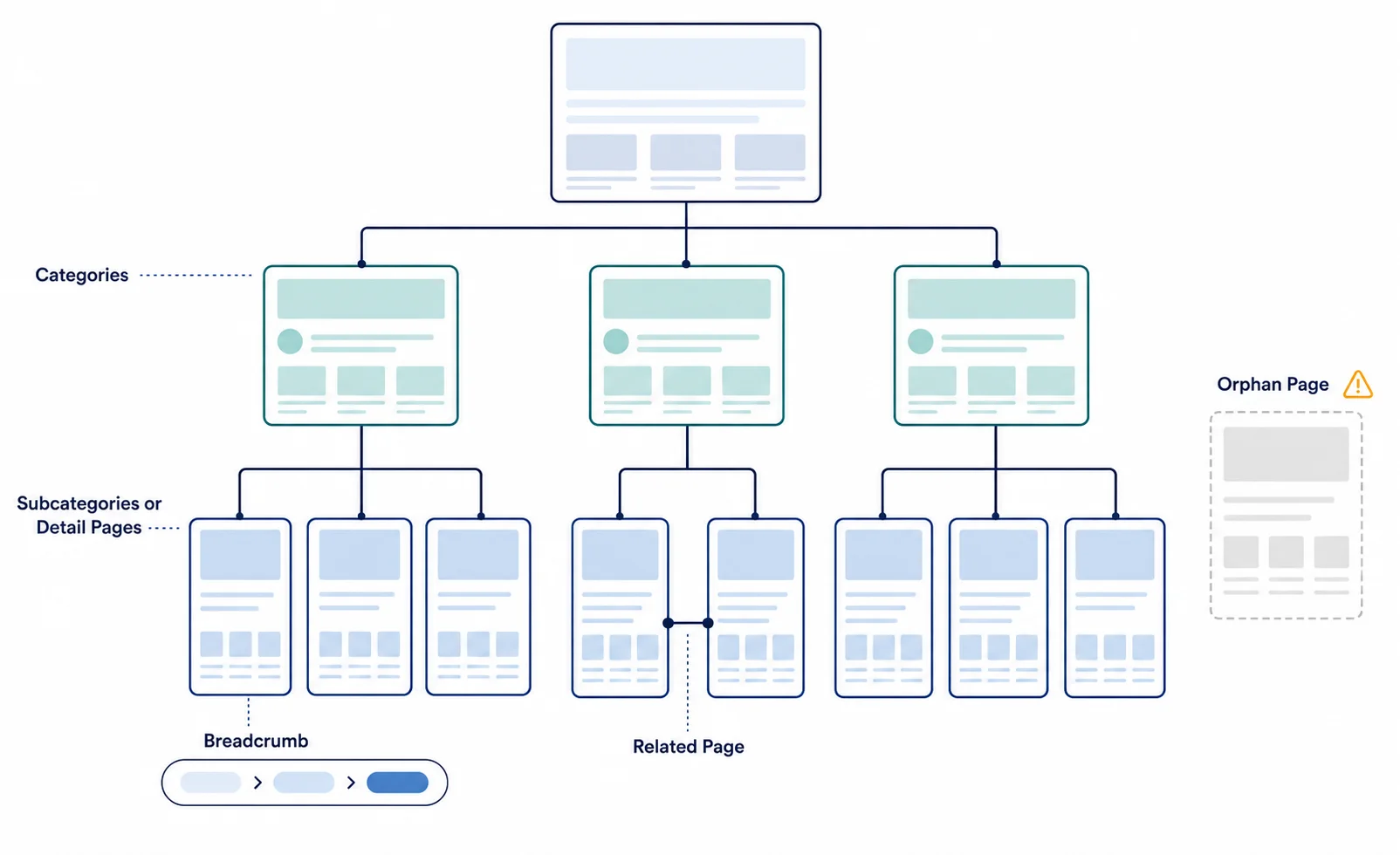
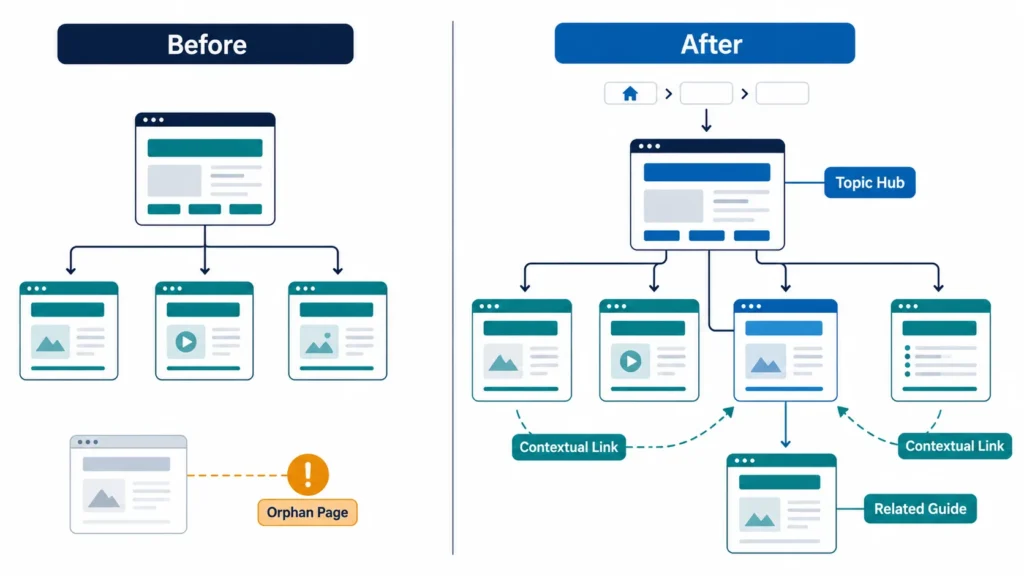
Contextual internal links connect a useful phrase in the body to a relevant page. Navigational links live in menus, breadcrumbs, sidebars, or footers. A hub-and-spoke structure connects a broad resource to deeper supporting pages and back again.
Use descriptive anchors without forcing one exact-match phrase. Link useful orphan pages from relevant hubs, keep important content within sensible link depth, and repair broken links.
| Source section | Natural anchor | Destination |
|---|---|---|
| Types of SEO | types of SEO | Detailed types guide |
| Keyword research | keyword research process | Future keyword-research guide |
| Technical SEO | technical SEO checklist | Future technical audit guide |
| Off-page SEO | free backlink research resources | Existing backlink-sites article |
| AI-search section | optimizing content for AI search | Existing authority and AI-search article |
Link externally to the exact official standard, source data, study, or specialist page supporting a claim. Qualify paid, affiliate, or user-generated links appropriately and disclose commercial relationships.
Images and formatting
Use near-display dimensions, responsive delivery, compression, descriptive filenames, nearby context, and captions when useful. Choose formats by need: SVG for vectors, PNG for transparency/interface detail, and WebP or AVIF for suitable photographs, with fallbacks as needed.
Alt text describes the image’s meaningful function for people who cannot see it. A useful example is “Flowchart showing discovery, crawling, indexing, ranking, and clicking.” Poor alt text is “SEO SEO guide best SEO search optimization.” A decorative flourish should normally use empty alt text (alt="") so assistive technology can skip it.
Use readable paragraphs, purposeful lists and tables, definitions, warning callouts, examples, steps, and useful visual breaks. A visible FAQ may answer genuine follow-ups without repeating the article.
12. Technical SEO in Detail
Technical SEO ensures that a website can reliably serve users and give search crawlers access to the correct, understandable version of its content. The goal is not a perfect audit score; it is to remove technical barriers and ambiguity.
Crawlability and indexability
Crawlability asks whether a crawler can discover and fetch a URL and its resources. Check <a href> links, server access, robots rules, sitemaps, broken links, and traps from calendars, sessions, searches, filters, or endless parameters. Indexability asks whether a fetched page can enter an index. Check meta/HTTP directives, noindex, canonicals, duplicates, soft 404s, redirects, login restrictions, and staging settings.
Robots.txt controls crawling, not reliable de-indexing. A crawler cannot see noindex on a blocked page. Require authentication for private content; for an accessible page that should leave search, allow crawling and use noindex. See the robots.txt introduction.
A simple example:
User-agent: *
Disallow: /internal-search/

Sitemap: https://www.example.com/sitemap.xml
Do not copy this blindly: one wrong path can block important resources. Test against the real CMS and URLs.
XML sitemaps, canonicals, and duplicate URLs
An XML sitemap helps discovery. Include successful, canonical, indexable URLs—not redirects, errors, blocks, or unwanted duplicates. Use truthful lastmod, sitemap indexes at scale, submit through webmaster tools, and monitor errors. It cannot guarantee indexing or ranking. See sitemap guidance.
Canonicalization identifies a representative duplicate. Align redirects, rel="canonical", sitemaps, and internal links across HTTPS, hosts, trailing slashes, print, tracking, and filters. A canonical is a signal, not a command. Redirect an unneeded alternate; canonicalize one that must remain accessible. Cross-domain canonicals may fit legitimate syndication.
HTTP status codes and redirects
| Code | Meaning and practical use |
|---|---|
| 200 | Successful response; use for a working page with real content |
| 301 | Permanent redirect; use when a URL has moved for the long term |
| 302 | Temporary redirect; use when the original URL should remain the long-term reference |
| 404 | Resource not found; suitable for a URL that does not exist |
| 410 | Resource intentionally gone; useful when removal is known and permanent |
| 429 | Too many requests; indicates rate limiting and should include sensible retry handling |
| 500 | Internal server error; fix recurring failures quickly |
| 503 | Temporary service unavailable; appropriate for brief maintenance, ideally with Retry-After |
Avoid redirect chains and loops. During a migration, map each old URL directly to the closest equivalent new URL—never redirect every removed page to the homepage. Update internal links, canonicals, hreflang, and sitemaps to final destinations. Google documents how it treats these responses in its HTTP and network errors guide.
Architecture and JavaScript SEO
A clear architecture uses logical categories, descriptive navigation, breadcrumbs, related links, scalable URLs, and no important orphans. “Shallow” means reasonable paths—not every URL in the main menu.
Client-side rendering builds in the browser; server-side rendering returns HTML per request; static generation creates it ahead of time. Each can work if critical content, links, titles, canonicals, and directives remain reliable. Progressive enhancement provides functional HTML before optional scripting.
Use real href links and do not require interaction to load primary content. Compare initial/rendered HTML and test live URLs for blocked scripts, API failures, blank shells, inconsistent canonicals, and interaction-only content. See JavaScript SEO basics.
Mobile experience, speed, and Core Web Vitals
Google uses mobile content for indexing and ranking. Responsive design is usually simplest; ensure parity in primary content, metadata, media, links, and markup. Provide readable fonts, usable navigation/tap targets, speed, and no content-blocking interstitial. See mobile-first practices.
Core Web Vitals measure important aspects of real user experience:
- Largest Contentful Paint (LCP): loading performance; “good” is 2.5 seconds or less.
- Interaction to Next Paint (INP): responsiveness; “good” is 200 milliseconds or less.
- Cumulative Layout Shift (CLS): visual stability; “good” is 0.1 or less.
Thresholds apply at the 75th percentile in web.dev guidance. Field data reflects eligible real users; lab data is controlled and diagnostic. Improve hosting, caching, images, render-blocking work, unused JavaScript, long main-thread tasks, and layout space. Speed matters, but cannot rescue irrelevant content.
HTTPS, structured data, pagination, and international sites
Serve the whole site over HTTPS, renew certificates, remove mixed content, patch software, use secure forms, and protect accounts. Security supports user trust and reliable access.
Structured data uses vocabularies such as Schema.org, often as JSON-LD. Mark visible content accurately and follow feature policies. Suitable types may include Article/BlogPosting, Organization, Person, BreadcrumbList, WebSite, LocalBusiness, Product, Course, or VideoObject. Validate syntax and feature eligibility. Markup guarantees neither rankings nor rich results. Google ended FAQ rich results in May 2026; HowTo was already deprecated. Keep useful visible content, but do not add those types for Google eligibility. Check structured-data policies.
Pagination and infinite scroll need unique, discoverable page URLs and crawlable links between result sets; a crawler does not scroll like a person. Preserve useful back-button behaviour and avoid loading indexable items only after interaction.
Duplicates can come from variants, parameters, print pages, policies, filters, or manufacturer text. Consolidate, redirect, canonicalize, or noindex according to user and crawl value; do not create copied city pages.
For international sites, choose maintainable country domains, subdomains, or folders; localize language, currency, examples, law, and offers; expose locale navigation; use reciprocal hreflang and locale canonicals; avoid forced IP redirects. See localized-version guidance.
Website-migration essentials
Before a migration, inventory URLs/performance; map direct redirects; update links, canonicals, hreflang, markup, and sitemaps; preserve analytics; verify webmaster properties; remove staging blocks at launch; and monitor errors, indexing, traffic, rankings, and conversions. Avoid combining every major change when possible.
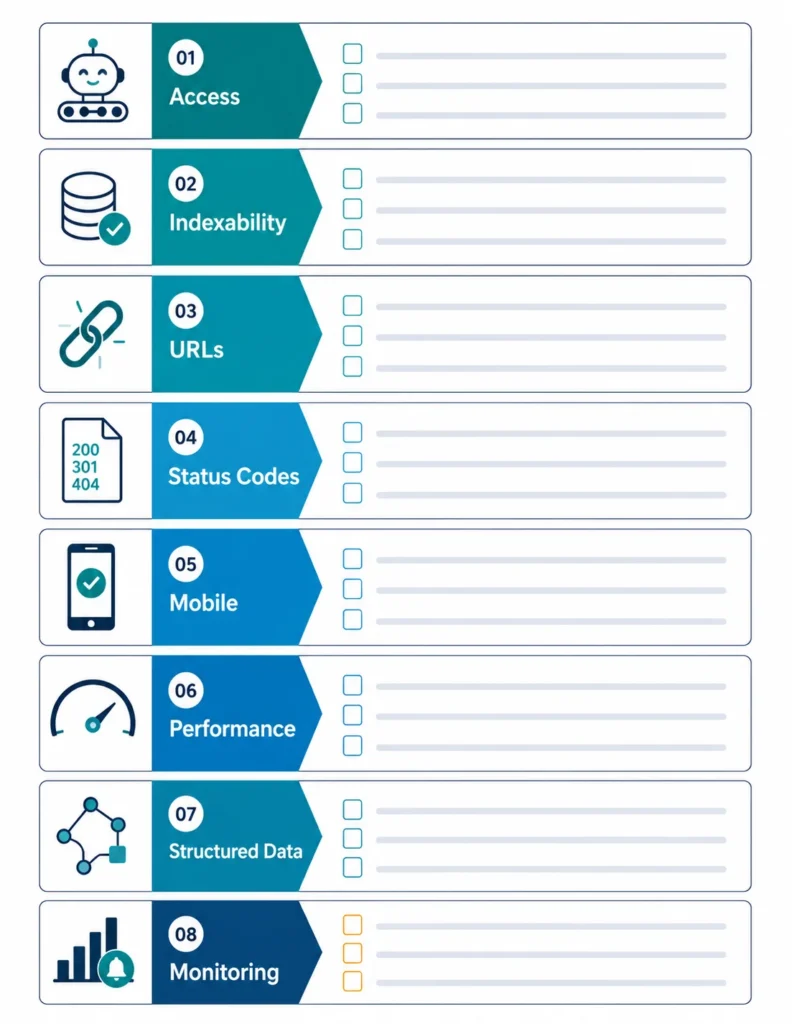
Technical SEO checklist
- [ ] Important pages return the intended status and are not login-protected.
- [ ] Robots rules and indexing directives match the plan.
- [ ] Internal links are crawlable; no important orphan or broken pages remain.
- [ ] Canonicals, redirects, internal links, and sitemaps agree.
- [ ] Mobile content and metadata match desktop essentials.
- [ ] Rendered HTML contains primary content and links.
- [ ] Core templates are usable, secure, and reasonably fast.
- [ ] Structured data is truthful, visible, supported, and validated.
- [ ] Pagination, filters, duplicates, and locale URLs are controlled.
- [ ] Monitoring alerts owners to server, indexation, or release problems.
13. Off-Page SEO and Link Building
A backlink is a link from another website to yours. Relevant editorial links can help search engines discover pages and provide independent evidence that a resource or organization is worth referencing. The value of a link depends on context, editorial reason, source quality, topical and audience relevance, placement, and the reputation of both sites—not a single score.
Anchor text is the linked wording. Natural editorial anchors vary: a brand name, page title, URL, or descriptive phrase. Link attributes communicate relationships: nofollow is a general qualification, sponsored identifies paid or compensated placements, and ugc identifies user-generated links. They are not tools for disguising a link scheme.
Ethical link earning starts with something worth citing: original research, useful statistics, free tools, templates, expert insight, strong case studies, visual resources, or a definitive guide. Promote it through relevant outreach, digital PR, genuine partnerships, professional communities, resource pages, and legitimate broken-link opportunities. Business citations and accurate profiles matter especially for local entities. Unlinked brand mentions can still build recognition and sometimes provide a natural outreach opportunity.
Avoid buying links for ranking, private blog networks, automated or comment spam, irrelevant directory blasts, hidden links, fake mentions, site-wide paid keyword anchors, excessive exchanges, and mass-produced guest posts with little reader value. These practices can violate Google’s link-spam policies.
An unfamiliar or weak-looking link is not automatically harmful. The web contains scrapers and low-quality pages that site owners did not create. Investigate patterns, intent, control, sudden changes, manual-action notices, and actual relevance before taking action. Use Search Console and Bing Webmaster Tools, plus more complete third-party indexes when needed. Compare multiple signals rather than treating Domain Authority, Domain Rating, or another proprietary metric as Google’s view.
RC Blog’s list of free backlink sites and research opportunities can support prospect discovery, but vet every destination for relevance, editorial standards, real users, and policy compliance. A smaller number of earned, useful references is safer than hundreds of submissions created only to influence rankings.
14. Local SEO
Local SEO helps eligible organizations appear when people search for a nearby place or a service in a particular area. It is most relevant to storefronts, offices that receive customers, service-area businesses that visit customers, institutions, venues, and multi-location brands.

A practical local SEO workflow
- Confirm eligibility and create or claim the real business in Google Business Profile; use Bing Places where it serves the market.
- Use the real-world business name—never add keywords that are not part of it.
- Enter an accurate staffed address or a truthful service area, phone, website, primary category, additional categories, services, regular and special hours.
- Add current photographs of the exterior, interior, team, products, or work where appropriate.
- Create a useful location page with services, staff or proof, address/service area, directions, landmarks, parking or access details, hours, contact options, and original local information.
- Keep core details consistent across the website, profiles, maps, major directories, and professional citations. Minor formatting differences matter less than factual accuracy.
- Ask real customers for honest reviews without incentives or pressure, and respond professionally to praise and criticism.
- Earn relevant local mentions through chambers, associations, sponsorships, suppliers, events, media, and community work.
- Add truthful LocalBusiness structured data to the matching visible location information when appropriate.
- Monitor duplicate listings, edits, calls, direction requests, website visits, enquiries, rankings by area, and customer feedback.
Google’s Business Profile guidelines require accurate representation, precise locations or service areas, appropriate categories, and generally one profile per business location. A multi-location organization needs a distinct, genuinely staffed location and a unique useful page for each branch—not copied city pages. Service-area businesses should not invent storefronts or virtual offices.
Avoid fake reviews, review gating, false locations, duplicate profiles, copied city pages, and keyword-stuffed names. These tactics mislead users and can lead to profile restrictions or removal.
15. Trust, Experience, Expertise, and Reputation
Trust grows when readers can see who created information, why it should be believed, how it was produced, and who is accountable for it. No badge or biography can compensate for inaccurate claims.
Publish helpful, reliable, people-first content with clear authorship. Use first-hand experience when the task benefits from it—for example, original photographs in a product review or a transparent method in a case study. Use subject-matter expertise for claims that require training. Cite strong primary sources, distinguish fact from opinion, correct errors openly, and show meaningful publication and update dates.
Support the page with:
- an accurate author page and byline;
- an About page explaining ownership and purpose;
- contact information and accessible customer support;
- editorial, corrections, privacy, terms, refund, advertising, and affiliate policies where relevant;
- secure delivery, clear disclosures, and honest calls to action;
- independent reviews and reputation management that do not suppress fair criticism.
E-E-A-T means experience, expertise, authoritativeness, and trustworthiness. Google says that E-E-A-T is not one specific ranking factor; its systems use a mix of signals that can identify qualities associated with it, and trust is the central member of the group. Search quality raters evaluate examples to help Google assess system performance, but raters do not directly rank pages.
Standards should rise with potential harm. Health, safety, financial stability, legal decisions, and other major life choices—often called YMYL, or “Your Money or Your Life,” topics—need especially strong sourcing, qualified review, cautious wording, current information, and clear limits. A casual travel diary can rely on lived experience; medical dosing guidance requires appropriate clinical expertise and authoritative evidence.
Use Google’s people-first and E-E-A-T self-assessment as a quality prompt, not a box-ticking formula. Ask: Who created this? How was it produced? Why does it exist? Would a reasonable reader trust it enough for the decision at hand?
16. How to Optimize for AI Search, Answer Engines, and Generative Search
AI-search optimization makes useful content easy to discover, retrieve, verify, and visit in generated-answer experiences. It builds on SEO rather than replacing it. Google’s AI Overviews and AI Mode, Microsoft’s cited-source Copilot Search, and other answer engines use different systems, so platform-specific advice is not universal.
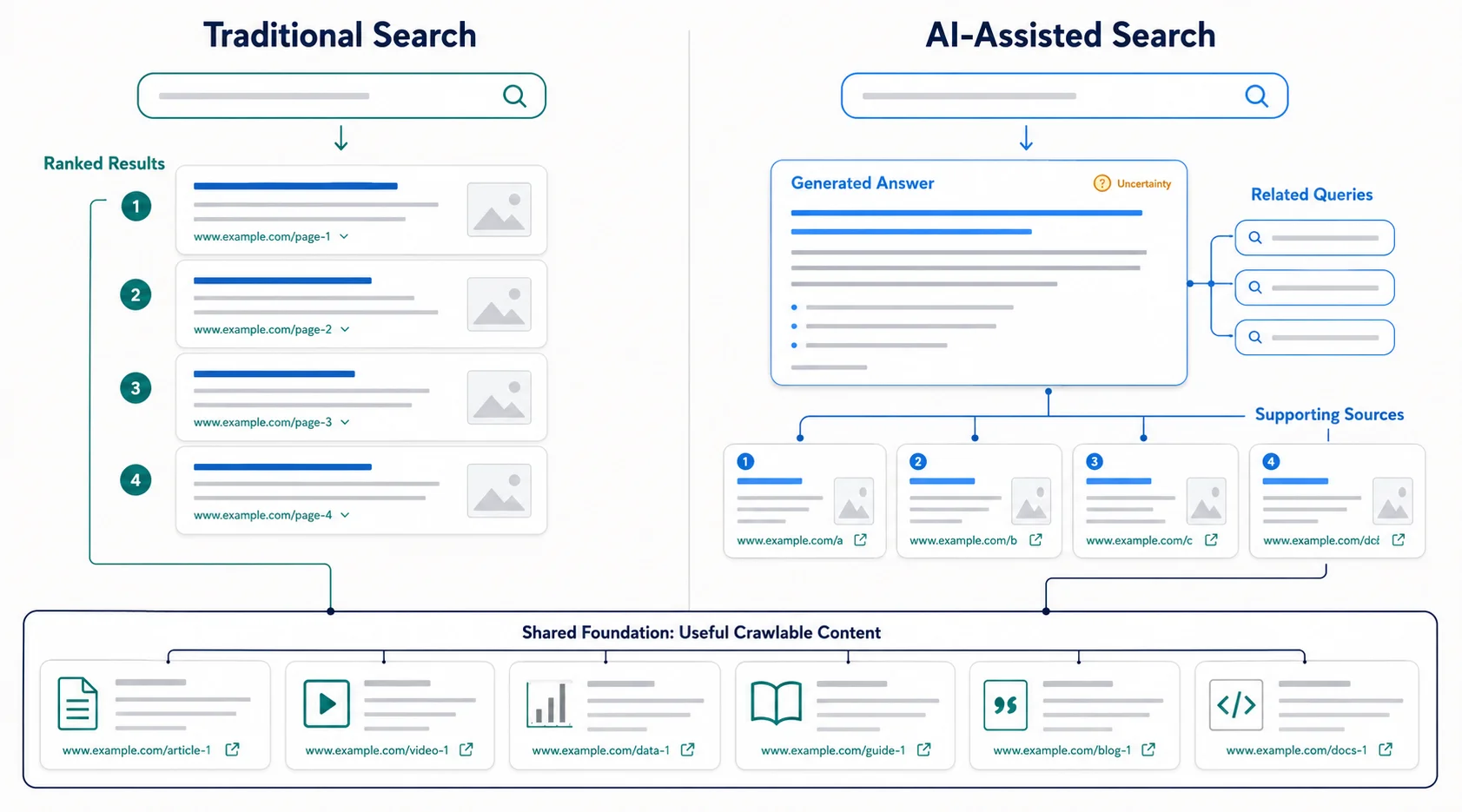
Google’s current generative AI search guide says its features build on core Search systems. It describes retrieval-augmented generation, which retrieves current pages to ground an answer, and query fan-out, which searches related sub-questions. A useful passage therefore need not repeat the user’s exact wording.
What AEO, GEO, and entity optimization mean
The labels are useful for discussing goals, but their boundaries are not settled.
| Practice | Main goal | Useful methods | Important limit |
|---|---|---|---|
| Traditional SEO | Earn relevant visibility and visits in organic results | Technical access, intent match, strong content, links, usability | A ranking never guarantees a click or conversion |
| Featured-snippet optimization | Make a concise passage suitable for a direct result | Answer-first wording, accurate definitions, steps, tables | Search engines choose and may rewrite the displayed passage |
| Answer engine optimization (AEO) | Help an answer system find a clear, defensible answer | Self-contained passages, source transparency, structured explanations | AEO is an evolving industry term, not a separate Google ranking system |
| Generative engine optimization (GEO) | Improve the chance of being retrieved or cited in generated responses | Original evidence, clear sections, fresh facts, discoverability, reputation | Citation methods and reporting vary by platform |
| Brand/entity optimization | Make a person, organization, product, or place consistently identifiable | Consistent names and facts, accurate profiles, About pages, credible mentions | Recognition cannot be manufactured with fake mentions or schema alone |
These practices overlap. One well-researched, clearly organized, identifiable source can serve ordinary results, snippets, and AI experiences.
How to make content easier to retrieve and cite
- Keep important pages public, crawlable, indexable, snippet-eligible, and available in accessible HTML. Where Google’s Search Console control is available, include the site in generative AI features.
- Answer the main question early, then add conditions, detail, and evidence.
- Use descriptive headings and focused sections for navigation and passage-level usefulness. Special “AI chunking” is unnecessary.
- Make key passages self-contained: name the subject and state relevant dates, units, locations, and limits.
- Identify authors and organizations, cite primary sources, correct errors, and label opinion or prediction.
- Add original research, experience, calculations, comparisons, images, or analysis instead of copied summaries.
- Keep entity names and facts consistent across the site and genuine profiles; never manufacture mentions.
- Use structured data only for matching visible content; no special AI schema is required.
- Connect related evidence and deeper resources with useful internal links.
- Review changing facts, broken citations, availability, and screenshots; document meaningful updates.
- Use tables, lists, steps, and examples only when they improve understanding.
- Earn links, reviews, references, and discussion through useful work—not automation.
No formula guarantees an AI citation. Visibility changes by query, system, location, language, date, device, sources, and rollout. Rankings and citations are related but different: a narrow passage may be retrieved without ranking first for the broad query, while a high-ranking page may not be cited.
Google says llms.txt and special AI markup neither help nor harm Google Search, although another service may use them. It also says structured data is not required for its generative features. Verify every platform-specific requirement.
How to measure AI-search visibility
Google’s Generative AI performance report is rolling out to a subset of Search Console properties. It currently reports AI Overview and AI Mode impressions by page, country, date, and device. Not seeing the report does not prove that the site has no visibility.
Microsoft’s public-preview AI Performance report reports supported citations, cited pages, sampled grounding queries, and trends. Citations are not rankings, authority, or conversions. Track identifiable referrals, assisted outcomes, and customer-reported discovery too.
17. How to Use AI for SEO Responsibly
AI can accelerate research and production, but humans remain responsible for strategy, evidence, expertise, editorial and ethical judgment, legality, brand voice, and final approval. Google does not say that AI-assisted content is automatically acceptable or automatically penalized; its generative AI content guidance focuses on usefulness and warns that generating many pages without value may violate the scaled-content-abuse policy.
Useful assistance includes topic discovery, keyword clustering, question generation, outline and content-brief drafts, metadata options, data classification, content-gap review, editing, summarization, reformatting, translation support, analytics explanations, and draft schema. Treat every output as unverified. AI can invent facts and references, misread intent, flatten the brand’s voice, omit exceptions, or produce invalid markup.
A responsible human-plus-AI workflow is:
- A human defines the audience, business goal, search intent, risk level, and success metric.
- Provide the tool with an approved source pack and no confidential data it is not allowed to process.
- Use AI for ideas, grouping, or a first draft—not as the source of truth.
- A subject expert adds original evidence, examples, judgment, and necessary nuance.
- Verify every factual claim against the cited source; open every link and validate dates, calculations, names, and schema.
- Edit for usefulness, originality, brand voice, accessibility, copyright, privacy, and legal requirements.
- Approve the final page, monitor real performance, and correct mistakes transparently.
Never publish unreviewed output, fabricate experience, rewrite competitors without adding value, automate link spam, stuff keywords, or create thousands of near-identical pages. The safe question is not “Was AI used?” but “Is the final page accurate, original, useful, and accountable?”
18. SEO Tools Organized by Purpose
SEO tools collect different slices of reality. Search-engine tools report data from their own systems; analytics tools report measured site activity; crawlers simulate discovery; and commercial databases estimate keywords, links, and rankings. No single score is an official measure of Google or Bing authority.
The following options were available when this guide was reviewed. Plans, limits, and features change, so verify the vendor page before purchasing.
| Purpose | Free or entry option | Paid option for scale | Decision supported and main limitation |
|---|---|---|---|
| Search performance | Google Search Console, Bing Webmaster Tools | Enterprise SEO platforms | Find queries, pages, indexing issues, and search trends. Data is platform-specific, aggregated, and subject to reporting limits. |
| Website analytics | Google Analytics or self-hosted Matomo | Matomo Cloud or Adobe Analytics | Connect landing pages to engagement and key events. Consent, blockers, attribution, and implementation errors can create gaps. |
| Keyword and demand research | Google Trends, Google Ads Keyword Planner, and Bing keyword research | Ahrefs, Semrush, Moz, or similar suites | Compare language, intent, seasonality, and opportunity. Volumes and difficulty scores are estimates, not promises. |
| Technical crawling | Screaming Frog SEO Spider free version | Licensed Screaming Frog, Sitebulb, Lumar, or Oncrawl | Find status codes, directives, duplicates, and link depth. A crawler may not reproduce every search-engine rendering decision. |
| Page speed | PageSpeed Insights, Chrome DevTools, and Lighthouse | DebugBear or SpeedCurve | Separate real-user field data from lab diagnostics and prioritize slow templates. A single lab score is not the user experience of everyone. |
| Structured data | Google’s Rich Results Test and Schema.org Validator | Schema management platforms | Detect syntax and eligibility issues. Valid markup does not guarantee a rich result and must match visible content. |
| Backlink analysis | Search Console and Bing Webmaster Tools link reports; Ahrefs Free for verified sites | Ahrefs, Semrush, or Majestic | Review earned links, referring domains, and risk patterns. Every provider has a different, incomplete web index. |
| Rank tracking | Search Console page/query trends | AccuRanker, Ahrefs, Semrush, or similar trackers | Watch selected markets, locations, and devices. A tracked position is a sample and can differ from a user’s result. |
| Local SEO | Google Business Profile and Bing Places | BrightLocal, Whitespark, or similar platforms | Maintain listings, reviews, local rankings, and citations. Coverage and local-grid samples vary. |
| Content optimization | Search results, Search Console, readability tools, and editorial checklists | Clearscope, MarketMuse, Surfer, or similar tools | Find gaps and improve clarity. Competitor-term recommendations are not required keyword lists. |
| Log-file analysis | Server logs with command-line or open-source analyzers such as GoAccess | JetOctopus, Oncrawl, or enterprise log tools | See actual bot requests and wasted crawling. Logs show requests, not why a search engine ranked a page. |
| Website monitoring | Search Console alerts and limited uptime monitors | ContentKing, Pingdom, or other monitoring platforms | Detect outages, noindex changes, broken templates, and regressions. Alerts still require human triage. |
Start with Search Console, Bing Webmaster Tools, an analytics platform, PageSpeed Insights, and a small crawler. Add paid tools only when their time savings or data coverage justify the cost.
19. How to Measure SEO Performance
Measure SEO as a chain: visibility → qualified visits → useful actions → business value. A rise at the beginning is encouraging, but it is not success if the right audience does not act.
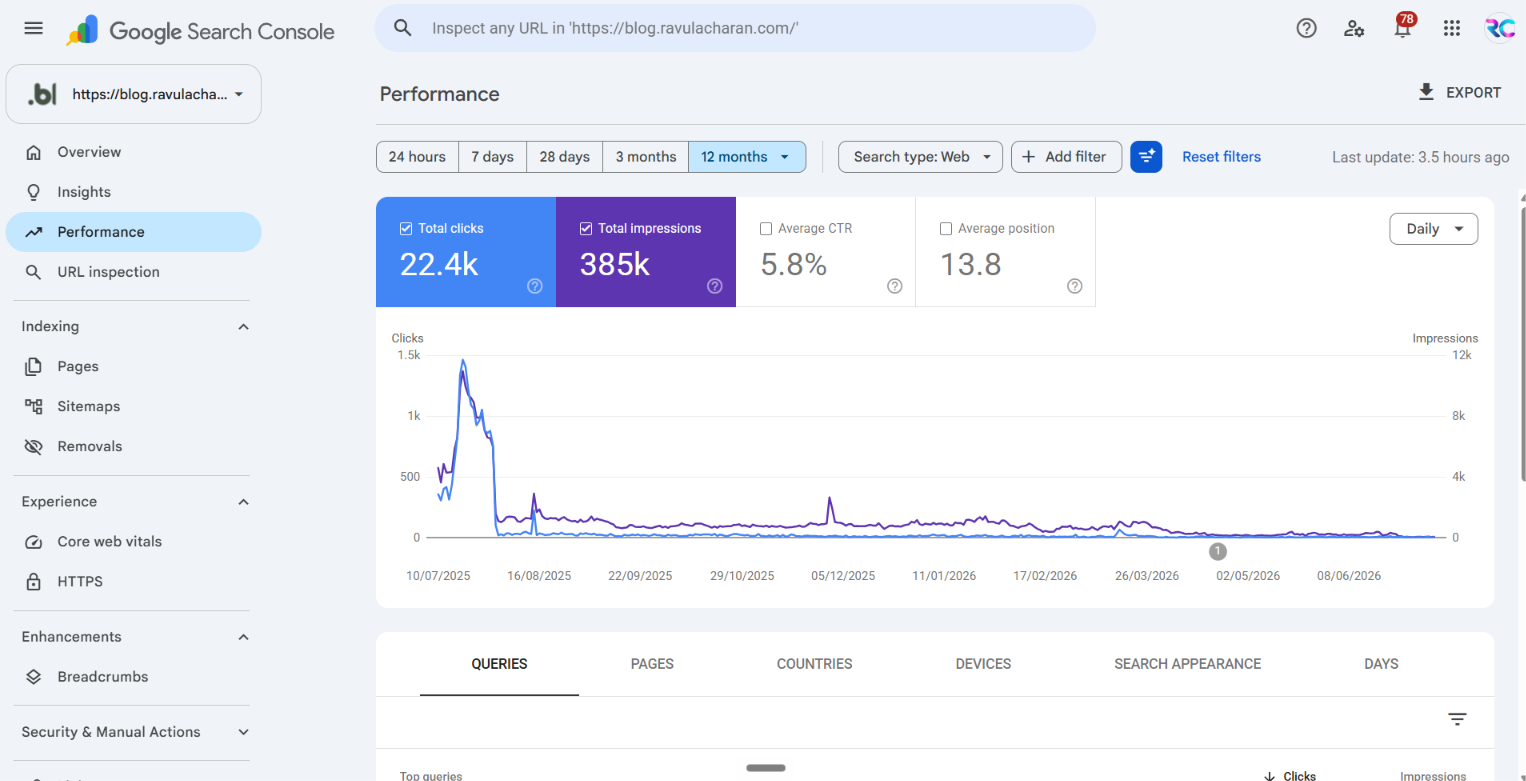
Leading indicators show progress before revenue arrives: valid indexed pages, crawl health, impressions, non-branded visibility, links earned, content published, and Core Web Vitals. Lagging indicators show outcomes: leads, sales, revenue, qualified calls, subscriptions, downloads, and retention. A ranking or third-party score can become a vanity metric when it is reported without relevance or business impact.
Use site-level analysis for overall direction and page-level analysis to diagnose a specific intent or journey. Traffic growth is not profitable growth when relevance, conversion quality, or margin declines.
Track these groups:
- Search visibility: organic clicks, impressions, click-through rate, branded versus non-branded demand, representative rankings, local actions, generative-AI impressions or citations where supported, and image/video visibility.
- Technical health: valid indexed pages compared with intended indexable pages, crawl errors, server availability, redirect and canonical problems, structured-data errors, and Core Web Vitals—LCP, INP, and CLS. PageSpeed Insights distinguishes historical field data from controlled lab diagnostics.
- On-site behavior: organic landing-page sessions, engaged sessions, navigation to important pages, and content or topic-cluster performance. In GA4, an engaged session lasts longer than ten seconds, has a key event, or has at least two page or screen views.
- Business outcomes: qualified forms, calls, purchases, revenue, downloads, newsletter signups, store visits where measurable, assisted conversions, cost per qualified lead, and return on investment.
- Authority and reputation: relevant new backlinks and referring domains, lost links, quality mentions, reviews, and referral traffic. Count relevance and business value, not just volume.
In current GA4 terminology, an important business action is a key event; “conversion” is used more specifically when that action supports advertising measurement or optimization. Ordinary business reports may still use conversion broadly, but define the metric.
Search Console defines CTR as clicks divided by impressions. Its average position is the average topmost position for the property or URL under its counting rules, not a universal “rank.” Results vary and some queries are hidden or aggregated, so use Search Console metrics for trends and diagnosis rather than as a perfect market census.
Sample monthly SEO report
| Report block | What to show | Decision |
|---|---|---|
| Executive outcome | Qualified leads, sales, revenue, cost, and important context | Continue, change, or stop investment |
| Visibility | Clicks, impressions, CTR, branded/non-branded trends, key markets | Improve weak topics or snippets |
| Landing pages | Winners, declines, engagement, and key-event rate | Protect, update, merge, or expand pages |
| Technical health | Indexing, crawl errors, CWV, outages, releases | Assign fixes by impact and owner |
| Authority/local | Earned links, mentions, reviews, listing actions | Focus outreach and reputation work |
| Work and next steps | Changes shipped, tests, lessons, next priorities | Maintain accountability |
Compare year over year where seasonality matters and annotate redesigns, migrations, campaigns, outages, tracking changes, and major search updates. Calculate ROI cautiously as (attributable incremental profit minus SEO cost) divided by SEO cost. Attribution is never complete: people switch devices, reject tracking, see a result without clicking, use several channels, or convert offline. GA4 itself explains that attribution models assign credit differently. Report a defensible range and assumptions instead of false precision.
20. How to Conduct a Complete SEO Audit
An SEO audit compares the site’s intended purpose with what users, search engines, and measurement systems can actually access. It should end with an owned, prioritized action list—not a large export of warnings.
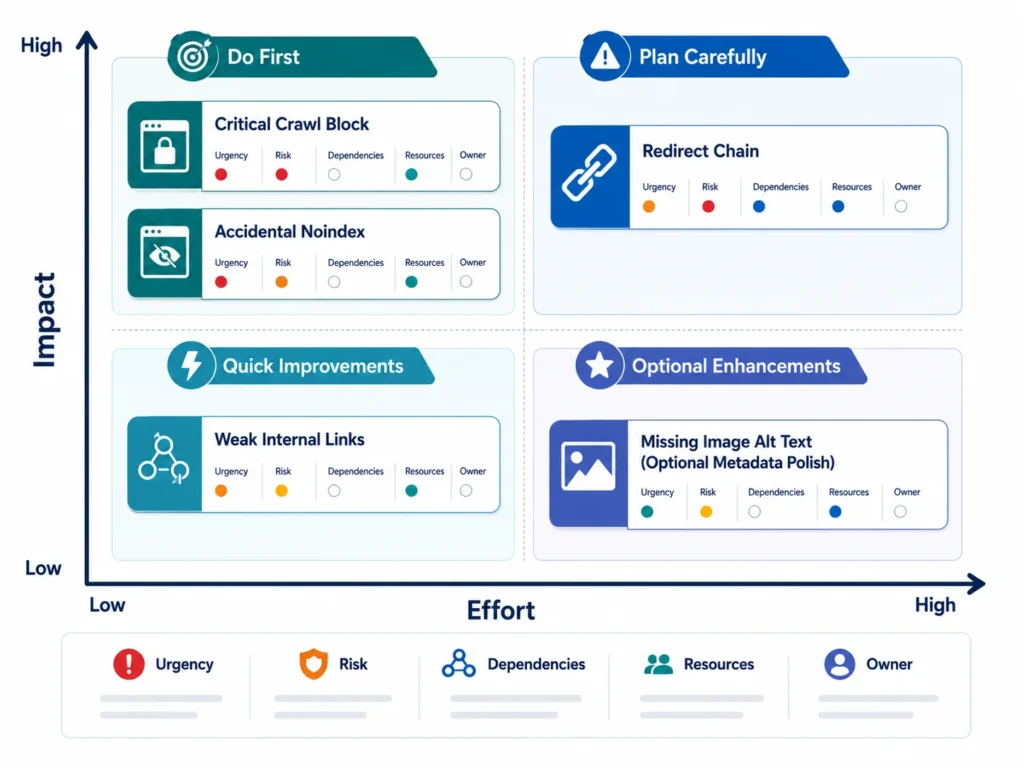
Follow this sequence:
- Confirm business goals and target audiences.
- Verify analytics, conversion events, Search Console, and Bing Webmaster Tools.
- Establish current visibility by market, device, page type, topic, and branded/non-branded search.
- Test crawling and indexing on representative templates.
- Review robots.txt, meta robots, and X-Robots-Tag directives.
- Check XML sitemaps for canonical, valuable, indexable URLs.
- Compare declared, selected, and internally linked canonical URLs.
- Map status codes, broken URLs, redirect chains, loops, and soft 404s.
- Review architecture, navigation, link depth, and contextual internal links.
- Find orphan pages by comparing crawl, sitemap, analytics, log, and backlink data.
- Test important journeys on real mobile devices.
- Review field and lab performance, including Core Web Vitals.
- Validate structured data against visible content and current feature rules.
- Map target topics and queries to the correct pages.
- Compare each page’s format and angle with search intent.
- Evaluate accuracy, originality, completeness, readability, authorship, and conversion help.
- Identify duplicate, thin, overlapping, declining, and outdated content.
- Review relevant backlinks, mentions, reviews, spam exposure, and lost links.
- Audit business listings, categories, service areas, local pages, and reviews where local search matters.
- Test forms, calls, checkout, subscriptions, and other conversion paths.
- Score issues by impact, effort, urgency, risk, resources, and dependencies.
- Assign an owner, approver, due date, and acceptance test.
- Implement in controlled batches; back up and stage high-risk changes.
- Measure crawl, index, traffic, and conversion effects after release.
- Repeat audits periodically and after migrations, redesigns, or major platform changes.
Use this prioritization model:
| Class | Typical meaning | Action |
|---|---|---|
| Critical | Site or valuable section unavailable, accidentally noindexed, hacked, or measurement/conversion path broken | Contain and fix immediately; involve engineering or security |
| Important | Intent mismatch, weak templates, internal-link gaps, poor mobile journey, declining high-value content | Schedule by impact and dependency |
| Enhancement | Optional schema, minor metadata polish, or low-volume improvement | Test after higher-value work |
A simple score can rate impact, urgency, and risk from 1–5, then compare that total with effort and resource constraints. Do not blindly fix every crawler warning: confirm the affected template, user harm, search evidence, and expected result first.
21. SEO Strategy for a New Website
A new site has little historical data, so good planning prevents expensive cleanup.
Before launch: research audiences, problems, search language, competitors, and content gaps. Design a shallow, understandable architecture; map one clear purpose to each important URL; plan navigation, content, templates, analytics, key events, Search Console, Bing Webmaster Tools, performance budgets, accessibility, canonicals, sitemaps, robots rules, and structured data. If the site replaces another, create a one-to-one redirect map and preserve valuable content and links.
At launch: remove staging blocks and accidental noindex directives; test public crawling, rendering, indexability, canonical tags, status codes, metadata, internal links, mobile journeys, forms, analytics, Core Web Vitals, and visible structured data. Put only canonical indexable URLs in the sitemap. Submission helps discovery, but a sitemap does not guarantee indexing.
After launch: inspect representative and high-value URLs, monitor indexing and server errors, fix template problems first, publish supporting content, earn legitimate mentions and links, improve conversion paths, and update pages from real query and customer data.
A realistic 30-, 60-, and 90-day roadmap
| Period | Priority | Deliverables and measurement |
|---|---|---|
| Days 1–30 | Launch safely | Verified tools, baseline report, clean crawl, sitemap, tested templates, key pages live; measure accessibility, index coverage, impressions, and tracking accuracy |
| Days 31–60 | Build useful coverage | Supporting articles, stronger internal links, page improvements from early queries, local/merchant setup if relevant; measure qualified impressions, clicks, engagement, and early actions |
| Days 61–90 | Learn and improve | Content-gap work, outreach, conversion tests, technical backlog, first update cycle; measure page/topic trends, leads, links, and issues resolved |
This is a work plan, not a promise of rankings within 90 days. Competition, demand, site quality, resources, and discovery speed differ.
22. How to Improve SEO on an Existing Website
Start by protecting what already works. Export historical landing-page, query, conversion, and backlink data before changing URLs, templates, content, or navigation. Identify pages that drive qualified outcomes, then preserve their intent, useful sections, internal links, metadata context, and URL whenever possible.
Segment existing pages into protect, improve, consolidate, redirect, or remove. Update outdated facts and weak examples; expand thin pages only when the added material helps the same intent; rework pages whose format does not match the result type users expect. Merge genuinely overlapping articles into the strongest destination, update internal links, and redirect retired URLs directly to the closest relevant equivalent. Do not redirect every deleted page to the home page.
Find orphan pages and strengthen contextual links from relevant hubs. Improve calls to action on traffic-rich pages, and compare conversion quality—not only visits. Remove a page only when evidence shows it has no useful purpose, demand, traffic, links, conversion value, or required historical/legal role.
For a redesign or migration, record the launch date, preserve a URL map, test redirects and canonicals, compare pre- and post-launch crawls, and monitor logs, indexing, rankings, traffic, and conversions. Annotate major changes in reports so later declines are not misdiagnosed.
23. Common SEO Mistakes and How to Correct Them
| Mistake | Why it hurts and how to correct it |
|---|---|
| Irrelevant keywords or ignored intent | Wrong visitors or format; choose topics tied to audience and business, then match the result type. |
| Keyword stuffing or fixed density | Repetition harms clarity and can violate policy; answer naturally with precise terms. |
| Generic, copied, or unreviewed AI content | It adds little value and may be false; require expert review, evidence, and original examples. |
| Identical titles or weak descriptions | Pages become hard to distinguish; write unique, accurate metadata for each purpose. |
| Weak links, orphans, or broken links | Discovery and journeys fail; link relevant hubs and passages, and repair dead destinations. |
| Slow or poor mobile pages | Users abandon tasks; simplify templates, optimize media, and test real devices. |
| Accidental noindex or blocked resources | Intended content may not render or index; test directives and rendered HTML around releases. |
| Wrong canonicals or redirect chains | Signals fragment and crawling wastes effort; use consistent URLs and direct redirects. |
| Duplicate location pages | Near-identical city pages lack local value; publish distinct pages only for genuinely served locations. |
| Misleading structured data | False markup can lose eligibility or trigger action; follow current guidelines and match visible facts. |
| Manipulative links | Artificial links create policy and reputation risk; earn relevant coverage through useful work and outreach. |
| Rankings without conversions | Position can rise without value; connect landing pages to qualified actions and profit. |
| Neglected updates | Facts, links, offers, and screenshots decay; review by risk and real change, not date alone. |
| Unplanned migrations | URLs, links, tracking, and signals can vanish; inventory, map, test, benchmark, and monitor. |
| Immediate-result expectations or one-time SEO | Teams quit early and quality decays; use staged measures and continuous maintenance. |
| Myths and tool scores treated as facts | Advice may be outdated or correlated; verify official guidance, evidence, and site-specific tests. |
24. White-Hat, Black-Hat, and Risky SEO
White-hat SEO is shorthand for work that helps users while following search-engine policies: improving access, content, usability, internal linking, accurate structured data, and legitimate promotion. The phrase is informal; the practical standard is whether the work is useful, truthful, and policy-compliant.
Black-hat SEO generally means deliberate manipulation such as cloaking, hidden keyword-stuffed text, doorway pages, scraped or scaled low-value content, hacked content, fake traffic, or link schemes. Risky SEO includes shortcuts whose purpose or execution may cross a policy line—for example, mass guest-post campaigns, expired-domain use, reputation-hosting arrangements, or automated pages created mainly to capture queries. This guide names them so you can recognize the risk, not reproduce the method.
Google’s current spam policies apply across Search, including generative features. Systems may algorithmically suppress or devalue spam without sending a message. Separately, a manual action occurs when a human reviewer finds a policy violation; Search Console’s Manual Actions report identifies affected issues and supports a review request after complete remediation.
A shortcut can cost more than lost visibility. It may damage the domain, waste development time, expose customers to misleading pages, and weaken brand trust. When uncertain, document the tactic, beneficiary, user value, source of links or content, disclosure, and relevant policy before approval.
25. Fifteen Common SEO Myths
- “SEO is dead.” Search interfaces change, but people still need systems that discover, understand, and present reliable web content.
- “AI has completely replaced SEO.” AI answers are one discovery path and often retrieve from search indexes; core technical and content work still applies.
- “More keywords always improve rankings.” More repetition can reduce clarity. Cover the user’s need with natural, specific language.
- “Every page needs a fixed keyword density.” Search engines publish no universal density target. Relevance is not a percentage.
- “Every backlink is equally valuable.” Relevance, legitimacy, placement, context, and the linking page differ; manipulative volume creates risk.
- “Domain Authority is a Google or Bing metric.” It is a third-party estimate. It can support comparison but is not an official search-engine score.
- “Duplicate content always causes a penalty.” Accidental duplication is usually a selection and efficiency problem, not automatically a spam penalty; deliberate deceptive duplication can violate policy.
- “Longer content always ranks better.” The right length is the shortest coverage that fully serves the intent. A calculator may beat a long article.
- “Structured data guarantees rich results.” Valid markup creates eligibility for supported features; display remains a search-engine decision.
- “A sitemap guarantees indexing.” A sitemap supports discovery but does not override quality, access, canonicalization, or indexing decisions.
- “Paying for ads improves organic rankings.” Advertising and organic systems are separate. Ads can create awareness, but payment does not purchase an organic position.
- “Changing only the publication date improves rankings.” A date without a meaningful update can mislead users. Refresh substance and disclose important changes.
- “AI-written content is automatically penalized.” The method alone is not the test; usefulness, accuracy, originality, and compliance are. Scaled low-value production is risky regardless of authoring tool.
- “SEO is a one-time project.” Sites, competitors, demand, technology, products, and search features change, so maintenance is part of the work.
- “Ranking first automatically creates business results.” The query may be irrelevant, the result may receive few clicks, or the page may fail to convert. Measure qualified outcomes.
26. The Future of SEO: Evidence and Cautious Predictions
Confirmed direction and prediction should not be mixed. It is already clear that major search products use generative, conversational, image, video, and multimodal experiences. It is also clear that search engines still need accessible web content and reliable sources.
The following are predictions, not guarantees:
- Discovery journeys will spread across traditional results, generated answers, video, images, maps, shopping surfaces, assistants, and agentic interfaces.
- Clear entity information and genuine brand reputation may become more valuable as systems compare several sources and users verify unfamiliar claims.
- First-party expertise, original research, transparent methods, and demonstrable experience may distinguish publishers from commodity summaries.
- Visual and video SEO will matter for more queries as people search with cameras, screenshots, speech, and mixed media.
- Structured information will remain useful for eligible search features and data exchange, but no markup will replace accurate visible content.
- Privacy choices, consent, platform reporting limits, and cross-device journeys will make measurement less complete; teams will need first-party data and honest attribution ranges.
- Fast, accessible, resilient websites will retain value because every search experience ultimately depends on whether users can use the source.
Traditional search is unlikely to disappear on a predictable schedule. Build durable assets—crawlable pages, useful tools, expert material, clear identity, strong customer experience, and trustworthy relationships—then adapt presentation and measurement as platforms publish evidence.
27. A Three-Month Beginner SEO Action Plan
This plan creates a working foundation. “Expected output” means a deliverable you control, not a promised ranking.
| Period | Tasks and required tools | Expected output and measurement | Mistake to avoid |
|---|---|---|---|
| Week 1: Setup and measurement | Verify Search Console and Bing Webmaster Tools; install analytics with consent; define key events; crawl the site; record a baseline | Working accounts, KPI sheet, issue list; test data accuracy, index status, organic landing pages, and conversions | Collecting data without testing forms, filters, or internal traffic |
| Week 2: Audience and keyword research | Interview customers; list problems; use search results, Trends, webmaster query data, and a spreadsheet; group by intent | Prioritized topic map and page map; measure relevance, existing visibility, business value, and gaps | Choosing only high-volume phrases unrelated to the offer |
| Week 3: Technical foundations | Fix critical access, status, directive, canonical, sitemap, mobile, performance, and internal-link issues using a crawler and PageSpeed Insights | Clean crawl for priority templates and assigned backlog; measure errors resolved and CWV evidence | Polishing minor tags while important pages remain blocked |
| Week 4: Content optimization | Improve the most valuable existing pages: intent, answer, headings, evidence, titles, images, links, CTA, and accurate schema | A small set of demonstrably better pages; measure impressions, engagement, and key events against the baseline | Rewriting every page at once or changing winning URLs |
| Month 2: Expansion and internal links | Publish missing supporting resources, add original examples, connect the topic cluster, repair orphans, and update weak pages | Coherent cluster and editorial calendar; measure coverage, indexation, qualified clicks, and assisted actions | Mass-producing shallow articles |
| Month 3: Promotion and improvement | Share useful assets with relevant communities and partners, earn legitimate mentions, improve local profiles if applicable, test conversion paths, and review results | Outreach record, new mentions/links, local improvements, and next-quarter plan; measure leads, sales, citations, reviews, and lessons | Buying links or declaring success from rankings alone |
Review the plan monthly. If a measurement or technical foundation is broken, fix it before increasing publishing volume.
28. Final SEO Checklist Before Publishing or Updating a Page
- [ ] Strategy: The page serves a real audience and organizational goal; success includes a useful action, not traffic alone.
- [ ] Keyword research: Topic, related language, demand, competition, business value, and overlap with existing pages were reviewed.
- [ ] Search intent: Format, angle, depth, locality, freshness, and any mixed intents match the likely need.
- [ ] Content: The answer is accurate, original, complete, readable, sourced, and fact-checked; examples and expertise are honest.
- [ ] On-page SEO: Title, H1, headings, URL, introduction, description, natural terminology, and CTA are clear and unique.
- [ ] Technical SEO: Status, rendering, crawlability, indexability, robots, noindex, canonical, redirects, duplicates, and sitemap inclusion are correct.
- [ ] Internal linking: Relevant pages link here descriptively; this page links onward and contains no important broken links.
- [ ] Structured data: Markup represents supported, visible facts and passes current syntax and feature validation.
- [ ] Images: Useful images are compressed, responsive, correctly sized, and appropriately described; decorative images create no accessibility noise.
- [ ] Mobile experience: Content, navigation, forms, tables, buttons, and overlays work on a real small screen.
- [ ] Performance: Field and lab data were separated; material media, rendering, layout-shift, and interaction problems were addressed.
- [ ] Off-page SEO: Promotion gives relevant people a genuine reason to reference the page; no manipulative endorsement is sought.
- [ ] Local SEO: Where relevant, business facts are consistent and the page offers distinct local value and contact options.
- [ ] AI-search readiness: Answers are clear, attributable HTML; authorship, sources, entities, evidence, and updates are transparent; no “AI hack” was added.
- [ ] Analytics: Organic landing pages and meaningful key events are measured with required consent.
- [ ] Conversion tracking: Forms, calls, checkout, downloads, and campaign tags were tested.
- [ ] Maintenance: The page has an owner and review trigger; indexing, links, outcomes, and feedback will be monitored.
Part 5: Frequently Asked Questions
29. Frequently Asked Questions About SEO
1. What does SEO mean?
SEO means search engine optimization. It is the continuing work of helping search engines discover and understand a website, while making its pages useful for people with relevant needs. SEO covers content, technical access, page organization, reputation, local information, user experience, and measurement. It aims for qualified organic visibility, not manipulation.
2. How does SEO work?
SEO improves the connection between a searcher’s need, a page’s answer, and a search engine’s ability to process that answer. You research intent, create or improve the right page, remove crawling and indexing barriers, connect it with links, and build legitimate reputation. Search engines still decide whether, where, and how to show it.
3. Is SEO free?
Organic listings are not charged per click, but SEO is not free. It requires time and may require writers, experts, developers, design, outreach, analytics, and tools. A small site can begin with free official platforms, yet the owner still invests effort. Evaluate SEO by useful outcomes and total cost, not by media spend alone.
4. How long does SEO take?
There is no reliable universal timeline. A technical fix may be processed quickly, while competitive content and reputation work can take much longer. Site history, crawl frequency, competition, demand, resources, quality, and the change itself all matter. Use early indicators such as indexing and relevant impressions, then measure qualified visits and conversions over time.
5. Can I do SEO myself?
Yes. A beginner can research customers, improve titles and content, add internal links, maintain business information, and use Search Console. Bring in specialists when a migration, server problem, JavaScript rendering issue, international setup, security incident, or large-scale template change exceeds your skills. Keep ownership of goals, access, data, and approvals.
6. What are the main types of SEO?
The core types are on-page, technical, off-page, local, and content SEO. Depending on the website, e-commerce, international, image, video, news, and enterprise SEO may also matter. These are connected rather than isolated departments: a strong product page still needs technical access, useful content, internal links, reputation, and measurement.
7. What is the difference between SEO and paid search?
SEO seeks visibility in unpaid search results through relevant, accessible, trustworthy pages. Paid search buys ad placement under an advertising auction and stops when spending or the campaign stops. The channels can share keyword and conversion lessons, but paying for ads does not purchase an organic ranking, and organic performance is not guaranteed.
8. What is technical SEO?
Technical SEO helps search engines access, render, understand, and index the intended website efficiently. It covers status codes, robots directives, canonicals, sitemaps, architecture, internal links, JavaScript, mobile behavior, performance, security, and structured data. Its purpose is to remove barriers; technical perfection alone cannot make an irrelevant page deserve visibility.
9. What is on-page SEO?
On-page SEO improves an individual page for its audience and topic. Work includes intent, accuracy, title, headings, introduction, URL, natural terminology, images, links, formatting, evidence, and calls to action. A good on-page process makes the answer clearer and easier to use. It does not mean repeating a keyword in every element.
10. What is off-page SEO?
Off-page SEO concerns signals and reputation beyond your own pages, including earned backlinks, editorial coverage, reviews, citations, partnerships, and genuine brand discussion. The safest approach is to do work worth referencing and promote it to relevant people. Buying manipulative links or manufacturing mentions can violate policies and damage long-term trust.
11. Are keywords still important?
Yes, because search language reveals how people describe needs, but exact-match repetition is not the objective. Keywords help you choose topics, understand intent, name pages, and measure demand. Search engines can connect related wording and concepts. Build one coherent answer around the user’s problem, then use precise terms naturally where they improve understanding.
12. How many keywords should one page target?
There is no correct fixed number. Give one page one clear primary purpose, then cover closely related questions and terminology that belong to the same intent. Separate a term when it requires a different audience, format, stage, location, or action. Keyword mapping prevents several pages from competing unnecessarily for the same need.
13. Does AI-generated content rank?
Content made with AI can appear in search, but AI use does not create quality or eligibility. Humans must verify facts, add original value, remove fabricated experience, and approve the result. Google’s AI-content guidance focuses on helpful content and policies; scaled low-value pages designed to manipulate rankings can violate spam rules.
14. How can my content appear in AI search?
There is no guaranteed inclusion method. Make the page crawlable and indexable, answer clearly, cite reliable sources, show authorship, add original evidence, maintain accurate entity information, and earn genuine recognition. Use each platform’s webmaster reporting where available. Do not assume llms.txt, special schema, or an “AI keyword” can force retrieval or citation.
15. Are backlinks still important?
Links can help search engines discover pages and understand relationships and reputation, but not every link is useful. A relevant editorial reference from a credible page differs from a paid network link. Focus on useful resources, research, service, public relations, and partnerships that merit a reference. Evaluate referral value and relevance alongside link counts.
16. Does website speed affect SEO?
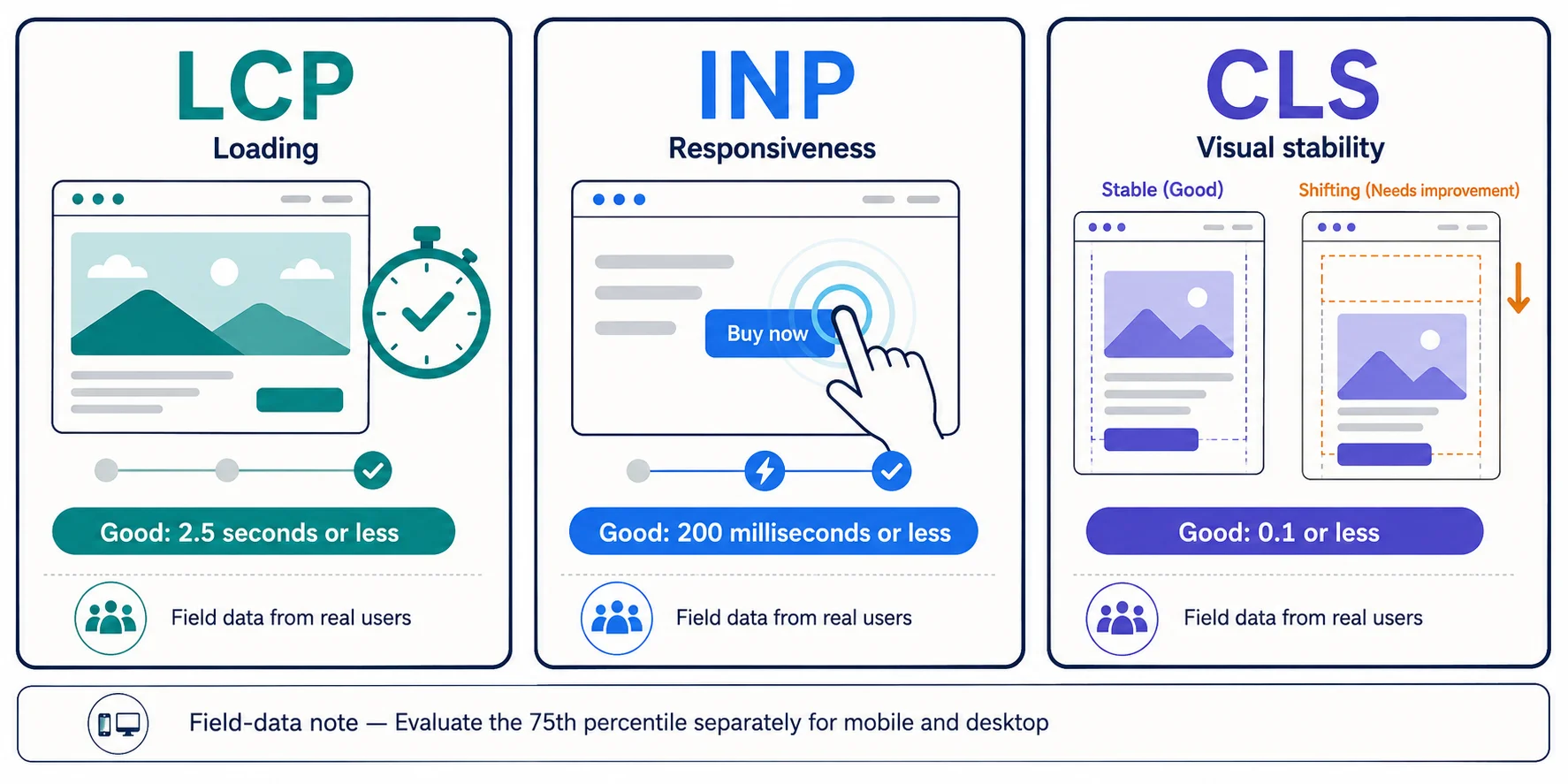
Performance supports usability and page experience, and Core Web Vitals are used by Google’s ranking systems, but speed is not a standalone guarantee. Improve slow templates because people benefit and conversions may improve. Judge LCP, INP, and CLS with real-user field data where available, using lab tests to diagnose causes.
17. What is structured data?
Structured data is machine-readable information that labels visible page meaning, often with Schema.org vocabulary in JSON-LD. It can make a page eligible for supported search features and reduce ambiguity, but it does not guarantee a rich result, ranking, or AI citation. The markup must be accurate, current, visible in substance, and valid.
18. How often should content be updated?
Update when the information, product, law, price, evidence, search intent, links, screenshots, performance, or business goal has materially changed. High-risk and fast-changing pages need more frequent review than evergreen definitions. Do not change a date without improving substance. Record meaningful revisions and preserve a successful page’s purpose unless evidence supports a larger change.
19. Which SEO tools should beginners use?
Begin with Google Search Console, Bing Webmaster Tools, an analytics platform, PageSpeed Insights, Google Trends, a spreadsheet, and a limited website crawler. Together they cover visibility, indexing, user actions, demand, performance, and common technical issues. Learn what each dataset omits before buying an all-in-one suite or trusting an automated priority score.
20. Can SEO guarantee first position?
No ethical professional or tool can guarantee first position. Search results depend on the query, location, device, competition, relevance, quality, context, search features, and systems outside the website owner’s control. A first position may also produce little business value. Set goals around qualified visibility, useful experiences, conversions, and sustainable improvement instead.
FAQ markup note: These visible questions help readers, but FAQPage markup should not be added automatically. Google stopped showing the FAQ rich-result feature on May 7, 2026 and later removed its documentation, as recorded in the Search documentation updates. Consider markup only for a platform that currently supports it, when the visible content and all platform rules genuinely apply.
Part 6: SEO Glossary
30. Beginner-Friendly SEO Glossary
- AEO (answer engine optimization): Work intended to make reliable answers easy for answer systems to retrieve and present.
- Alt text: A text alternative that communicates an informative image’s purpose to people who cannot see it.
- Anchor text: The visible, clickable words used in a link.
- Backlink: A link to your page from another website.
- Canonical: The preferred representative URL among duplicate or very similar URLs.
- Click-through rate (CTR): Clicks divided by impressions, usually expressed as a percentage.
- Conversion: A valuable completed action, such as a purchase, form, call, or signup.
- Core Web Vitals: Google’s user-experience metrics for loading, responsiveness, and visual stability: LCP, INP, and CLS.
- Crawl: The process of requesting and examining web resources.
- Crawler: Automated software that discovers and processes web resources.
- Duplicate content: Identical or substantially similar content available at more than one URL.
- Entity: An identifiable person, organization, product, place, or concept.
- Featured snippet: A prominent result that extracts an answer from a web page.
- GEO (generative engine optimization): An evolving term for improving visibility in generative answers.
- Hreflang: HTML or sitemap annotations connecting language or regional versions of a page.
- Index: A search engine’s processed collection of content that may be retrieved.
- Internal link: A link between pages on the same website.
- JSON-LD: A JavaScript-based format commonly used to add structured data.
- Keyword: A phrase used to plan or measure a search topic.
- Keyword cannibalization: Overlapping pages competing for the same intent and weakening clarity.
- Landing page: The first page a visitor reaches from a result or campaign.
- Link equity: Informal term for value that ranking systems may pass through links.
- Long-tail keyword: A specific, often lower-volume phrase expressing a narrower need.
- Manual action: A Google action applied after human review finds a spam-policy violation.
- Meta description: A page summary that search engines may use or rewrite for a snippet.
- Noindex: A directive requesting that a search engine not index a resource.
- Organic traffic: Unpaid visits arriving from search-engine results.
- Orphan page: A page with no discoverable internal link from the site.
- Query: The actual words or input a person submits to search.
- Ranking: The ordering or selection of results for a particular search context.
- Redirect: A response that sends a browser or crawler from one URL to another.
- Referring domain: A separate domain containing at least one backlink to a site.
- Rendering: Processing page resources to produce the content and layout users can experience.
- Rich result: A search result enhanced with supported visual or interactive information.
- Robots.txt: A root-level file that controls crawler access; it is not a reliable noindex method.
- Schema markup: Structured data using the Schema.org vocabulary.
- Search intent: The need or outcome behind a query.
- SERP: Search engine results page.
- Sitemap: A file listing preferred URLs or media to support discovery.
- Status code: An HTTP response number such as 200, 301, 404, or 500.
- Structured data: Machine-readable labels that describe visible content and relationships.
- Technical SEO: Work that improves crawling, rendering, indexing, architecture, and technical experience.
- Topical authority: A non-official term for demonstrated depth and reputation around a subject.
- URL slug: The readable path segment identifying a specific page.
31. Conclusion: Build SEO Around People, Evidence, and Continuous Improvement
Search engine optimization connects genuine user needs with useful, accessible, trustworthy web pages. Its most durable principles are simple: understand intent, publish something worth finding, remove technical barriers, organize information clearly, earn reputation honestly, and measure outcomes that matter.
SEO is not a one-time launch task or an instant shortcut. Search behavior, websites, competitors, products, and AI-assisted experiences keep changing. Begin with the checklist above, fix the most damaging barrier, improve one important page, and measure what happens before expanding.
If your organization needs help turning this guide into a practical website, content, SEO, and digital-growth system, learn about Nothing Down. A capable agency should explain priorities clearly, connect work to business goals, and never promise a guaranteed ranking.
Part 7: Internal and External Linking Plan
Internal-linking plan
Use links only where they help the reader continue a task. The pillar should link down to detailed cluster pages, and each cluster page should link back to the pillar with natural, varied anchor text.
| Suggested anchor text | Destination topic or URL | Recommended section | Why link here? | Create? |
|---|---|---|---|---|
| types of SEO | https://blog.ravulacharan.com/types-of-seo/ | Main Types of SEO | Gives readers a deeper treatment after the overview | No; existing |
| responsible backlink opportunities | https://blog.ravulacharan.com/best-free-backlink-sites-for-website/ | Off-Page SEO | Extends the ethical promotion discussion; review the destination periodically for quality and policy alignment | No; existing |
| domain authority, rankings, and AI search | https://blog.ravulacharan.com/how-to-increase-domain-authority-improve-google-rankings-and-optimize-for-ai-search/ | Measurement or AI Search | Adds nuance about third-party metrics and broader visibility | No; existing |
| keyword research step by step | /keyword-research-guide/ | Keyword Research | Moves readers from concepts to a dedicated workflow and template | Yes |
| how to analyze search intent | /search-intent-guide/ | Search Intent | Supports page-type, format, angle, and funnel decisions | Yes |
| on-page SEO checklist | /on-page-seo-checklist/ | On-Page SEO | Provides a reusable pre-publish workflow | Yes |
| technical SEO guide | /technical-seo-guide/ | Technical SEO | Lets developers and site owners go deeper without bloating the pillar | Yes |
| internal-linking strategy | /internal-linking-seo/ | Internal Linking | Supports architecture, anchor, orphan-page, and priority-page decisions | Yes |
| ethical link-building guide | /link-building-guide/ | Off-Page SEO | Expands link earning, digital PR, outreach, and risk checks | Yes |
| local SEO checklist | /local-seo-guide/ | Local SEO | Gives location-based organizations a separate implementation path | Yes |
| best SEO tools for beginners | /seo-tools-guide/ | SEO Tools | Allows current screenshots, comparisons, and plan limitations to be maintained separately | Yes |
| complete SEO audit checklist | /seo-audit-checklist/ | SEO Audit | Converts the audit overview into a downloadable working process | Yes |
| optimize content for AI search | /ai-search-optimization-guide/ | AI Search | Holds fast-changing platform guidance in an easier-to-update cluster page | Yes |
| measure SEO performance | /seo-kpis-measurement/ | Measurement | Adds dashboards, event definitions, and reporting templates | Yes |
| Core Web Vitals guide | /core-web-vitals-guide/ | Speed and Core Web Vitals | Provides implementation examples by metric | Yes |
| structured data for beginners | /structured-data-seo-guide/ | Structured Data | Explains type selection, JSON-LD, validation, and eligibility | Yes |
| website migration SEO checklist | /seo-site-migration-checklist/ | Website Migrations | Reduces risk during redesigns and URL changes | Yes |
Implementation note: Add three to six contextual internal links in the pillar’s opening two-thirds, additional links where a deeper task begins, and breadcrumb/navigation links through the template. Do not force every proposed link into the first version. After the cluster grows, use a crawler to find orphan pages, excessive click depth, redirected internal links, and vague anchors such as “click here.”
External-linking plan
| Claim or concept | Preferred official page | Suggested anchor text | Why this source is trustworthy |
|---|---|---|---|
| SEO eligibility and core practices | Google Search Essentials | Google Search Essentials | First-party Google Search policy and best-practice documentation |
| Crawling, indexing, and serving are distinct and not guaranteed | How Google Search Works | how Google Search works | Google’s direct explanation of its discovery and processing stages |
| People-first content and E-E-A-T nuance | Creating Helpful, Reliable, People-First Content | Google’s people-first content guidance | Official guidance, including the statement that E-E-A-T is not one specific ranking factor |
| Manipulative links, keyword stuffing, and scaled-content abuse | Spam Policies for Google Web Search | Google Search spam policies | Current policy source for practices that can cause lower visibility or removal |
| Generative-AI search optimization and unsupported “hacks” | Optimizing for Generative AI Features | Google’s generative-AI search guide | Official 2026 guidance on RAG, query fan-out, non-commodity content, measurement, and what is not required |
| AI visibility reporting | Search Generative AI Performance Reports | Search Console generative-AI reports | Google’s launch announcement defining the report and its initial metrics |
robots.txt is not a secure deindexing mechanism | Introduction to robots.txt | Google’s robots.txt guidance | Official explanation of crawl controls, indexing limitations, and security caveats |
| Sitemaps assist discovery but do not guarantee indexing | What Is a Sitemap? | Google sitemap guidance | First-party sitemap purpose and implementation rules |
| Duplicate URL consolidation | Canonical URL Guidance | canonicalization methods | Official guidance on redirects, rel="canonical", sitemaps, and signal consistency |
| JavaScript rendering and indexing | JavaScript SEO Basics | JavaScript SEO basics | Google’s documented crawl-render-index process and implementation advice |
| Core Web Vitals and search | Core Web Vitals and Google Search | Core Web Vitals guidance | First-party explanation of how the metrics fit within wider page experience |
| Metric definitions and thresholds | Web Vitals | Core Web Vitals metrics | Google’s web performance documentation for LCP, INP, CLS, field data, and thresholds |
| Structured-data accuracy and eligibility | General Structured Data Guidelines | structured-data guidelines | Official content, technical, relevance, and quality requirements |
| Blog article markup | Article Structured Data | Article structured data | Google’s supported properties and implementation guidance for article pages |
| Schema vocabulary | BlogPosting on Schema.org | Schema.org BlogPosting type | Maintained vocabulary reference; use Google documentation for Google-specific display behavior |
| Search Console clicks, impressions, CTR, and position | Search Console Metric Definitions | Search Console metric definitions | Official measurement definitions and calculation caveats |
| Bing Search and Copilot eligibility | Bing Webmaster Guidelines | Bing Webmaster Guidelines | Microsoft’s current guidance for search, Copilot, and grounding visibility |
| Fast change notification for participating engines | IndexNow Documentation | IndexNow documentation | Protocol documentation maintained by the participating search ecosystem |
| International language and region annotations | Localized Versions of Pages | hreflang guidance | Official implementation and troubleshooting guidance |
| Business Profile quality rules | Google Business Profile Guidelines | Business Profile guidelines | Google’s rules for names, addresses, categories, service areas, and representation |
| 2026 FAQ rich-result retirement | Google Search Documentation Updates | Google Search documentation updates | Official changelog documenting the May 2026 retirement |
Part 8: Visual Content Plan
Create original graphics in a consistent RC Blog system: simple shapes, high-contrast labels, readable type at mobile widths, and a restrained color palette. Export diagrams as SVG where the publishing stack supports accessible SVG; otherwise use WebP/PNG with compressed fallbacks. Keep the same information available in nearby HTML text.
| Visual | Purpose and recommended location | Description | Suggested dimensions | Suggested alt text | Format |
|---|---|---|---|---|---|
| SEO process diagram | After the introduction | User need → query → useful page → search visibility → qualified visit → action → measurement and improvement | 1600 × 900 | SEO process from user need and search query to useful page, visit, conversion, and improvement | Original diagram |
| Crawl-index-rank pipeline | How Search Engines Work | Separate discovery, crawl, render, index, retrieve, rank, show, click, and convert, with “not guaranteed” gates | 1800 × 1000 | Stages from URL discovery through crawling, rendering, indexing, ranking, clicking, and conversion | Original diagram |
| Types of SEO map | Main Types of SEO | A central website with branches for on-page, technical, off-page, local, content, ecommerce, international, image, video, news, and enterprise SEO | 1800 × 1200 | Eleven types of SEO connected to one website strategy | Original diagram |
| Search-intent matrix | Search Intent | Rows for informational, navigational, commercial, transactional, and local intent; columns for query cues, typical page type, and next action | Responsive HTML table; max width 1200 | Search intent categories with query cues and suitable content types | HTML table |
| Keyword-research workflow | Keyword Research | Audience → problems → seeds → ideas → SERP review → intent → grouping → mapping → priority → measurement | 1800 × 900 | Step-by-step keyword research workflow from audience problems to measurement | Original diagram |
| Topic-cluster diagram | Semantic SEO and Topical Authority | Pillar in the center, nine supporting guides around it, with two-way internal-link arrows | 1600 × 1600 | SEO pillar page linked to keyword, on-page, technical, links, local, tools, audit, AI search, and measurement guides | Original diagram |
| Website architecture diagram | Technical SEO | Home → category → subcategory → detail pages, with breadcrumbs and related-page links; flag an orphan page separately | 1800 × 1100 | Logical website hierarchy with crawlable internal links, breadcrumbs, and an orphan-page warning | Original diagram |
| Technical SEO checklist | End of Technical SEO | Compact checklist grouped by access, indexability, URLs, status codes, mobile, performance, schema, and monitoring | 1400 × 1800 | Technical SEO checklist covering access, indexing, URLs, mobile, speed, schema, and monitoring | Original checklist graphic plus HTML list |
| Core Web Vitals explainer | Speed and Core Web Vitals | Three panels: LCP loading, INP responsiveness, CLS stability; include current “good” thresholds and field-data note | 1800 × 900 | Core Web Vitals: LCP up to 2.5 seconds, INP up to 200 milliseconds, and CLS up to 0.1 at the 75th percentile | Original diagram |
| Internal-linking example | On-Page SEO | Before/after miniature site map showing an orphan guide becoming part of a hub-and-spoke cluster | 1600 × 900 | Before-and-after internal linking example connecting an orphan guide to a topic hub | Original diagram |
| Local SEO workflow | Local SEO | Profile accuracy → categories/services → pages → reviews → citations/links → tracking → maintenance | 1600 × 900 | Local SEO workflow from accurate business information to reviews, local pages, links, and measurement | Original diagram |
| Traditional vs AI-assisted search | AI Search | Compare retrieval, result format, source links, query fan-out, measurement, and uncertainty without implying one replaces the other | 1800 × 1000 | Comparison of traditional search results and AI-assisted search responses with supporting sources | Original diagram or HTML comparison table |
| Search Console screenshot | Measurement | Annotated first-party screenshot showing query, page, country, device, date, and search-appearance filters; remove sensitive data | Native capture, minimum 1600 px wide | Search Console performance report with filters for SEO analysis | Original screenshot |
| Audit prioritization matrix | SEO Audit | Four quadrants for impact and effort; add urgency, risk, dependencies, and owner labels to the issue cards | 1600 × 1200 | SEO audit issues prioritized by impact, effort, urgency, risk, and dependencies | Original diagram |
| 90-day roadmap | New Website / Beginner Plan | Weeks 1–4, month 2, and month 3 with setup, research, foundations, content, links, and measurement | 1800 × 1000 | Ninety-day SEO roadmap covering setup, research, technical work, content, promotion, and measurement | Original timeline |
Author additions worth making: an anonymized Search Console screenshot, one URL Inspection example, one PageSpeed Insights before/after example, and a real RC Blog internal-link map. Do not fabricate improvements; show dates, scope, and method if results are added.
Part 9: Structured Data Template
Suitability evaluation
BlogPostingorArticle: suitable. The page is a long-form educational blog article.BlogPostingis the more specific Schema.org type; Google’s Article documentation applies toArticle,NewsArticle, andBlogPosting.Person: suitable. Use it for Ravula Charan only with an accurate author page, biography, and profile links that are actually controlled or verified.Organization: suitable. Use RC Blog or the legal publishing organization consistently. Do not switch between brand and company names without a clear relationship.BreadcrumbList: suitable. Use it if visible breadcrumbs show the same path.WebSite: suitable only at site level. Google’s site-name guidance placesWebSitemarkup on the domain or subdomain home page, not on each article. The article can refer to an existing site entity if the site’s schema system already maintains one, but should not create a second conflicting object.FAQPage: not recommended for Google rich results. Google retired FAQ rich results in May 2026. Visible FAQs remain useful for readers; markup does not create a guaranteed ranking or AI-citation benefit.
JSON-LD template requiring validation
Replace the two clearly labeled asset/profile placeholder paths with live, crawlable URLs. Confirm the publisher name, publication time, modification time, image dimensions, author page, and visible breadcrumb before publishing. If an SEO plugin already emits overlapping schema, edit the existing graph instead of adding a duplicate.
<script type="application/ld+json">
{
  "@context": "https://schema.org",
  "@graph": [
    {
      "@type": "Organization",
      "@id": "https://blog.ravulacharan.com/#publisher",
      "name": "RC Blog",
      "url": "https://blog.ravulacharan.com/",
      "logo": {
        "@type": "ImageObject",
        "url": "https://blog.ravulacharan.com/REPLACE-WITH-LIVE-LOGO-URL.png"
      }
    },
    {
      "@type": "Person",
      "@id": "https://blog.ravulacharan.com/#ravula-charan",
      "name": "Ravula Charan",
      "url": "https://blog.ravulacharan.com/REPLACE-WITH-LIVE-AUTHOR-PAGE/"
    },
    {
      "@type": "BlogPosting",
      "@id": "https://blog.ravulacharan.com/search-engine-optimization/#article",
      "mainEntityOfPage": {
        "@type": "WebPage",
        "@id": "https://blog.ravulacharan.com/search-engine-optimization/"
      },
      "headline": "Search Engine Optimization: The Complete Beginner's Guide to SEO",
      "description": "Learn how SEO works and how to improve content, technical health, links, local visibility, measurement, and AI-search readiness step by step.",
      "image": [
        "https://blog.ravulacharan.com/REPLACE-WITH-LIVE-FEATURED-IMAGE-URL.webp"
      ],
      "datePublished": "2026-07-11T09:00:00+05:30",
      "dateModified": "2026-07-11T09:00:00+05:30",
      "author": {
        "@id": "https://blog.ravulacharan.com/#ravula-charan"
      },
      "publisher": {
        "@id": "https://blog.ravulacharan.com/#publisher"
      },
      "inLanguage": "en"
    },
    {
      "@type": "BreadcrumbList",
      "@id": "https://blog.ravulacharan.com/search-engine-optimization/#breadcrumb",
      "itemListElement": [
        {
          "@type": "ListItem",
          "position": 1,
          "name": "Home",
          "item": "https://blog.ravulacharan.com/"
        },
        {
          "@type": "ListItem",
          "position": 2,
          "name": "SEO",
          "item": "https://blog.ravulacharan.com/seo/"
        },
        {
          "@type": "ListItem",
          "position": 3,
          "name": "Search Engine Optimization",
          "item": "https://blog.ravulacharan.com/search-engine-optimization/"
        }
      ]
    }
  ]
}
</script>
Validate Google-supported rich-result eligibility with the Rich Results Test, validate the broader Schema.org graph with the Schema Markup Validator, and inspect the live canonical URL in Search Console. Passing a validator confirms syntax and some eligibility rules; it does not guarantee a rich result, ranking, citation, or AI visibility.
Part 10: Publishing Checklist
Editorial review
- [ ] The article has one clear H1 and a logical H2–H4 hierarchy.
- [ ] The introduction answers the reader’s problem and contains a concise, self-contained SEO definition.
- [ ] Every technical term is explained when first used.
- [ ] Examples are original, hypothetical, or supported by real evidence.
- [ ] No passage claims first-hand experience that was not supplied by the author.
- [ ] Repetition, filler, generic transitions, and unnatural keyword use have been removed.
- [ ] The Nothing Down call to action is brief, accurate, and secondary to the educational purpose.
- [ ] A second human editor has checked flow, tone, grammar, and beginner comprehension.
Fact-checking
- [ ] Every time-sensitive claim was checked on the publication date.
- [ ] Search-engine behavior is linked to current first-party documentation.
- [ ] Recommendations are distinguished from confirmed platform requirements.
- [ ] No correlation is called a confirmed ranking factor without evidence.
- [ ] No statistics, quotations, case studies, tool limits, or features are invented.
- [ ] The article says crawl, index, ranking, rich-result, citation, traffic, and conversion outcomes are not guaranteed.
- [ ] The 2026 Google generative-AI guide and limited Search Console report rollout are described accurately.
- [ ] FAQ and HowTo rich-result advice reflects Google’s current deprecations.
- [ ] Vendor tool names, plans, and features are checked again if the tools section changes.
On-page SEO
- [ ] The title and H1 describe the content and set honest expectations.
- [ ] The canonical URL is final before indexing.
- [ ] The meta description is useful and not treated as a ranking guarantee.
- [ ] The primary topic appears naturally in the title, H1, introduction, and relevant body sections.
- [ ] Headings organize ideas; they are not stuffed with repeated keywords.
- [ ] Tables remain readable on small screens.
- [ ] The clickable table of contents uses working fragment links.
- [ ] All three existing RC Blog links point to the intended live pages.
- [ ] External links point directly to authoritative pages and open normally.
- [ ] Link anchors explain the destination without forcing exact-match phrasing.
Technical validation
- [ ] The page returns
200 OKand is not blocked by authentication, firewall, CDN rules, orrobots.txt. - [ ] No
noindexdirective is present on the intended canonical page. - [ ] The self-referencing canonical is absolute and correct.
- [ ] The page appears once in the XML sitemap with an accurate modification date.
- [ ] Internal links use crawlable
<a href>elements. - [ ] The rendered HTML contains the main article, headings, links, image text alternatives, and schema.
- [ ] Deleted or changed source URLs do not create redirect chains or broken links.
- [ ] The mobile page contains the same primary content and metadata as desktop.
- [ ] Search Console URL Inspection and Bing URL Inspection show the expected live page.
Accessibility
- [ ] Heading levels do not skip solely for visual styling.
- [ ] Link text makes sense outside its surrounding sentence.
- [ ] Informative images have concise, contextual alt text; decorative images use empty alt text.
- [ ] Diagrams have adjacent text or long descriptions carrying the same information.
- [ ] Text and controls meet contrast requirements.
- [ ] Keyboard users can reach and operate the table of contents, links, accordions, and media controls.
- [ ] Tables use real header cells and remain understandable without color.
- [ ] Video has captions; audio information has a transcript.
Mobile and performance review
- [ ] Read the complete article on a narrow mobile viewport, not only in a desktop preview.
- [ ] No table, code sample, image, or callout causes horizontal page overflow.
- [ ] Body text and tap targets are comfortable to read and use.
- [ ] The featured image is responsive and not larger than necessary.
- [ ] Below-the-fold images are lazy-loaded; the likely LCP image is not carelessly deferred.
- [ ] Image dimensions or aspect ratios are reserved to reduce layout shift.
- [ ] Field Core Web Vitals are reviewed when enough data exists; lab tests are used for diagnosis.
- [ ] Third-party scripts, fonts, ads, embeds, and consent tools are checked for delay and layout movement.
Structured-data testing
- [ ] Markup describes visible content and uses the same title, author, dates, image, and publisher shown to readers.
- [ ] Placeholder image, author, and logo URLs are replaced with live absolute URLs.
- [ ] Duplicate schema emitted by themes or plugins is reconciled.
- [ ]
BlogPosting/Article,Person,Organization, andBreadcrumbListrelationships are accurate. - [ ] The visible breadcrumb matches
BreadcrumbList. - [ ] The Rich Results Test and Schema Markup Validator pass without material errors.
- [ ] No fake ratings, reviews, awards, or unsupported properties are present.
- [ ] Editors understand that valid markup does not guarantee a rich result, rank, or AI citation.
Analytics and conversions
- [ ] Analytics loads only under the site’s consent and privacy requirements.
- [ ] Search Console and Bing Webmaster Tools properties are verified for the correct protocol and host.
- [ ] Primary conversions are defined: contact submission, qualified call, newsletter signup, download, or another real action.
- [ ] Test events record once and carry no unnecessary personal data.
- [ ] UTM conventions are documented for promotion, not added to internal links.
- [ ] A launch annotation records the URL, date, title, and major site changes.
- [ ] The reporting view can separate page performance, query themes, country, device, branded/non-branded demand where available, and conversion outcomes.
Indexing and internal linking
- [ ] The page is linked from a relevant hub or navigation path before submission.
- [ ] At least two existing relevant pages link contextually to the new pillar.
- [ ] URL Inspection is used to confirm the live version; requesting indexing is optional, not a guarantee.
- [ ] Bing receives the sitemap; use IndexNow where it fits the site’s publishing workflow.
- [ ] Important cluster pages link back to the pillar.
- [ ] No internal link points to a redirect, parameter duplicate, staging host, or insecure URL.
- [ ] The page is not orphaned and is reachable within a sensible number of clicks.
Promotion
- [ ] Share the guide with audiences who genuinely need it instead of submitting it to unrelated directories.
- [ ] Prepare a useful social summary, newsletter introduction, and educator/student version.
- [ ] Offer diagrams or the checklist to relevant partners with transparent attribution.
- [ ] Consider outreach only where the resource directly improves an existing article or curriculum.
- [ ] Qualify paid, sponsored, or user-generated links correctly.
- [ ] Do not buy ranking links, automate comment spam, manufacture mentions, or exchange links at scale.
Monitoring and updates
- [ ] Check crawl/index status and rendering after launch.
- [ ] Review early impressions and queries for intent mismatches, not for daily ranking anxiety.
- [ ] Measure engagement and conversions alongside clicks.
- [ ] Track meaningful edits and technical releases.
- [ ] Recheck external references quarterly and after major policy announcements.
- [ ] Revisit fast-changing AI-search, structured-data, tool, and measurement sections more often than stable fundamentals.
- [ ] Update facts and examples only when needed; do not change the date alone to imply freshness.
- [ ] Consolidate overlapping future posts instead of creating cannibalizing variants.
- [ ] Preserve performing URLs during redesigns and migrations unless a change has a clear, tested reason.
Part 11: Content-Cluster Recommendations
The pillar should be the learning hub; supporting pages should solve narrower jobs more deeply. Each cluster page should link back to the most relevant pillar section, and the pillar should add a contextual link once that cluster article is genuinely useful and published.
| Proposed supporting article | Primary keyword | Intent | Target audience | Purpose | Internal-link relationship | Suggested CTA |
|---|---|---|---|---|---|---|
| Types of SEO Explained: When to Use Each One | types of SEO | Informational | Beginners, students, owners | Expand all major SEO disciplines with decision examples | Existing page links to the pillar definition; pillar’s types overview links down | Choose the SEO type your site needs first |
| Keyword Research for Beginners: A Step-by-Step Workflow | keyword research | Informational/practical | Writers, marketers, owners | Provide seed, intent, clustering, mapping, and priority templates | Two-way link with Keyword Research section | Build your first keyword map |
| Search Intent: How to Match the Right Page to Every Query | search intent | Informational | Writers, SEOs, ecommerce teams | Teach SERP, format, angle, depth, freshness, and journey analysis | Link from pillar intent section and back to the strategy overview | Audit the intent of one important page |
| On-Page SEO Checklist for Every Page | on-page SEO checklist | Practical | Editors, bloggers, marketers | Create a reusable pre-publish and update checklist | Link from on-page section; return link to the complete SEO guide | Optimize one page with the checklist |
| Technical SEO for Beginners and Developers | technical SEO | Informational/practical | Site owners, developers | Deepen crawl, index, rendering, status, canonical, JS, and architecture guidance | Link from technical overview; return link for wider strategy | Run the technical baseline checks |
| How to Create and Submit an XML Sitemap Correctly | XML sitemap | Informational/practical | CMS users, developers | Explain eligible URLs, indexes, lastmod, validation, and submission | Link from Technical SEO sitemap subsection | Validate your sitemap before submission |
| Robots.txt vs Noindex: What Each Directive Actually Does | robots.txt vs noindex | Informational | Developers, site owners | Prevent a common, high-risk indexing mistake | Link from crawlability and indexability subsections | Check one blocked or excluded URL |
| Internal Linking for SEO: Architecture, Anchors, and Orphan Pages | internal linking SEO | Informational/practical | Publishers, ecommerce teams | Turn navigation and contextual links into a clear discovery system | Link from on-page and architecture sections | Find and connect your orphan pages |
| Ethical Link Building: How to Earn Relevant Backlinks | link building | Informational/commercial | Marketers, founders, PR teams | Cover linkable assets, outreach, digital PR, attributes, and risk | Link from off-page section; reference the existing backlink resource carefully | Plan one link-worthy resource |
| Local SEO Guide for Small and Multi-Location Businesses | local SEO | Informational/practical | Local owners, marketers | Profile, reviews, pages, citations, duplicates, and tracking | Link from local overview and back to pillar | Complete the local visibility checklist |
| SEO Tools for Beginners: Free and Paid Options by Task | SEO tools | Commercial investigation | Beginners, small teams | Compare tools by decisions, limitations, and workflow instead of hype | Link from tools section; return to methods before products | Build a minimal tool stack |
| How to Conduct an SEO Audit and Prioritize Fixes | SEO audit | Informational/practical | Owners, consultants, developers | Provide templates for evidence, impact, effort, urgency, risk, and owners | Link from audit section and back to foundations | Audit your five highest-value templates |
| SEO KPIs: How to Measure Traffic, Leads, Revenue, and ROI | SEO KPIs | Informational | Marketers, analysts, owners | Define leading/lagging indicators, attribution, and reporting | Link from measurement section; return to strategy goals | Create a one-page monthly report |
| Core Web Vitals: LCP, INP, and CLS Explained | Core Web Vitals | Informational/practical | Developers, owners | Explain field/lab data, thresholds, diagnosis, and fixes | Link from technical speed subsection | Test one high-traffic template |
| Structured Data for Beginners: Schema, JSON-LD, and Validation | structured data SEO | Informational/practical | Developers, publishers | Teach truthful type selection, implementation, and testing | Link from structured-data subsection; return to overall SEO context | Validate one live page |
| How to Optimize Content for AI Search Without SEO Myths | AI search optimization | Informational | SEOs, creators, leaders | Maintain current Google/Bing guidance, reporting, AEO/GEO nuance, and unsupported tactics | Link from AI-search section; return to foundational SEO | Improve one page’s original, verifiable value |
| Ecommerce SEO: Category, Product, Facet, and Merchant Data Guide | ecommerce SEO | Informational/commercial | Store owners, developers | Handle architecture, unique value, filters, availability, reviews, and feeds | Link from types and technical sections | Audit one category and one product template |
| International SEO and Hreflang: A Practical Guide | international SEO | Informational/practical | Global businesses, developers | Explain localization, URL choices, hreflang, canonicals, and testing | Link from international SEO sections | Map every language-region URL pair |
| SEO Website Migration Checklist: Protect URLs and Measurement | SEO migration checklist | Practical | Developers, project managers | Reduce redesign and platform-move risk with mapping and monitoring | Link from migrations and existing-site sections | Complete the pre-launch redirect map |
| Image and Video SEO: Discovery, Accessibility, and Performance | image SEO and video SEO | Informational/practical | Publishers, creators, ecommerce teams | Combine formats, alt text, transcripts, thumbnails, schema, and delivery | Link from types and AI-search sections | Optimize one media-heavy page |
References
All links below were selected as primary or authoritative sources and checked for relevance on July 11, 2026. Search documentation changes; check the displayed update date and changelog again when the article is published or materially revised.
- Search Engine Optimization (SEO) Starter Guide — Google Search Central. https://developers.google.com/search/docs/fundamentals/seo-starter-guide
- Google Search Essentials — Google Search Central. https://developers.google.com/search/docs/essentials
- In-Depth Guide to How Google Search Works — Google Search Central. https://developers.google.com/search/docs/fundamentals/how-search-works
- Creating Helpful, Reliable, People-First Content — Google Search Central. https://developers.google.com/search/docs/fundamentals/creating-helpful-content
- Spam Policies for Google Web Search — Google Search Central. https://developers.google.com/search/docs/essentials/spam-policies
- Optimizing Your Website for Generative AI Features on Google Search — Google Search Central. https://developers.google.com/search/docs/fundamentals/ai-optimization-guide
- AI Features and Your Website — Google Search Central. https://developers.google.com/search/docs/appearance/ai-features
- Introducing Search Generative AI Performance Reports in Search Console — Google Search Central Blog. https://developers.google.com/search/blog/2026/06/gen-ai-performance-reports
- Generative AI Performance Report — Google Search Console Help. https://support.google.com/webmasters/answer/16984139
- Google Search Documentation Updates — Google Search Central. https://developers.google.com/search/updates
- Introduction to Robots.txt — Google Search Central. https://developers.google.com/search/docs/crawling-indexing/robots/intro
- What Is a Sitemap? — Google Search Central. https://developers.google.com/search/docs/crawling-indexing/sitemaps/overview
- How to Specify a Canonical URL — Google Search Central. https://developers.google.com/search/docs/crawling-indexing/consolidate-duplicate-urls
- Understand the JavaScript SEO Basics — Google Search Central. https://developers.google.com/search/docs/crawling-indexing/javascript/javascript-seo-basics
- Mobile Site and Mobile-First Indexing Best Practices — Google Search Central. https://developers.google.com/search/docs/crawling-indexing/mobile/mobile-sites-mobile-first-indexing
- Localized Versions of Your Pages — Google Search Central. https://developers.google.com/search/docs/specialty/international/localized-versions
- Understanding Core Web Vitals and Google Search Results — Google Search Central. https://developers.google.com/search/docs/appearance/core-web-vitals
- Web Vitals — web.dev. https://web.dev/articles/vitals
- How the Core Web Vitals Thresholds Were Defined — web.dev. https://web.dev/articles/defining-core-web-vitals-thresholds
- Introduction to Structured Data Markup in Google Search — Google Search Central. https://developers.google.com/search/docs/appearance/structured-data/intro-structured-data
- General Structured Data Guidelines — Google Search Central. https://developers.google.com/search/docs/appearance/structured-data/sd-policies
- Article Structured Data — Google Search Central. https://developers.google.com/search/docs/appearance/structured-data/article
- BlogPosting — Schema.org. https://schema.org/BlogPosting
- Schema Markup Validator — Schema.org. https://validator.schema.org/
- Rich Results Test — Google. https://search.google.com/test/rich-results
- What Are Impressions, Position, and Clicks? — Google Search Console Help. https://support.google.com/webmasters/answer/7042828
- Bing Webmaster Guidelines — Microsoft Bing Webmaster Tools. https://www.bing.com/webmasters/help/webmaster-guidelines-30fba23a
- Bing Webmaster Tools Help and How-To Center — Microsoft Bing. https://www.bing.com/webmasters/help/
- IndexNow Documentation — IndexNow. https://www.indexnow.org/documentation
- Guidelines for Representing Your Business on Google — Google Business Profile Help. https://support.google.com/business/answer/3038177
- Google Search Quality Rater Guidelines — Google. https://guidelines.raterhub.com/searchqualityevaluatorguidelines.pdf
- Search Generative AI Control — Google Search Console Help. https://support.google.com/webmasters/answer/16908024
- Key Events and Conversions — Google Analytics Help. https://support.google.com/analytics/answer/13965727